How to play
Check how to operate the game and when you run into trouble.
Categories: 12 · Articles: 79 · Terms: 31
Search in How to play. Separate words with spaces to find entries containing all of them.
Search by situation
Select the current status to see the order in which to check.
Three points shown in the diagram

Completion, publication, and delivery are separate stages.
From publishing the completed model to delivering it to the customer.

Check people, seats, and computing resources together
When work stops, look for missing conditions.

Sales and cash on hand are different
Even if there are sales, cash will decrease due to expenditures and payments on equipment.
All gameplay help
Articles: 79 · Terms: 31
First time management5
First company and daily basic operations.
Where should I start with my first company?
First, let's connect one piece of research and one offer. Before increasing facilities, you can make a reasonable decision by checking the company's current cash, personnel, and computational resources.
Where should I start with my first company?
First, let's connect one piece of research and one offer. Before increasing facilities, you can make a reasonable decision by checking the company's current cash, personnel, and computational resources.
Locations that open in-game
- Navigation at the bottom of the screen
First, let's connect one piece of research and one offer. Before increasing facilities, you can make a reasonable decision by checking the company's current cash, personnel, and computational resources.
The first goal is to bring one business to full circle.
We develop the foundation through research, create models through learning, and then publish and provide products. Then read the actual sales and expenses. By first confirming this flow, it will be easier to determine whether the shortage is in performance, supply, or funding.
Before you start
- Before proceeding with the week, look at cash, personnel, seats, and available computing resources.
- If you want to use guidance, select it on the founding screen.
For example:Before starting new learning
If the company already has a model on offer, take a look at the supply and income of that product first. If the supply is insufficient, training of a new model will start at the same time, competing for the same computational resources. After determining the required allocation and ongoing costs, decide on your next study.
Operating procedure
- Check the company's conditions and policies on the founding screen. If you would like to follow the instructions, select "Guide to 90 Days of Founding."
- Check cash, expenses, current customers, available personnel and computational resources on the company screen. Depending on the initial conditions, there are already models and clouds available.
- Check the cost of the research theme, the number of personnel and research seats required, and select the field to pursue.
- Review the training design and cost, and read the evaluation of the completed model before making a publishing decision.
- After publication, we will confirm allocation, fees, and supply for API products. Completion of the model alone does not necessarily mean that the product will be ready for the customer.
- Advance the days and look at the actual balance and supply for 7 days. After confirming the difference between sales, expenses, and cash, decide on your next investment.
Confirmation after operation
- We confirm that there is a connection from research to model publication and allocation to products.
- Look at the actual sales, expenses, and supply for 7 days and decide on the next investment.
be careful
There is no need to build a large data center from the beginning. You can decide on the scale by looking at your existing equipment, cloud, and monthly payments.
How do you use the “90 Days of Business Startup Guide”?
This is an optional guide that steps you through research, publication, provision to customers, and actual revenue and expenditure. 90 days are in-game days.
How do you use the “90 Days of Business Startup Guide”?
This is an optional guide that steps you through research, publication, provision to customers, and actual revenue and expenditure. 90 days are in-game days.
Locations that open in-game
- Founding screen/information and short-term scenario
- Information on 90 days of founding
This is an optional guide that steps you through research, publication, provision to customers, and actual revenue and expenditure. 90 days are in-game days.
A guide tells you where to check next.
We will distinguish between progress in the guidance stage and changes in the actual state of the company. Learn, publish, and serve on the original screen. If in doubt, check the purpose written in the guide and the current condition of the target model/product.
For example:I have a completed model, but the guidance does not proceed.
It is possible that the publication after completion or distribution of products has not been completed yet. We will look at the status of the completed model, the product delivery model, and the actual delivery record in order. It is easier to understand the steps required for the next step one by one than to open the guide multiple times.
Operating procedure
- Select it on the startup screen for a new company, or start from "Information and short-term scenario" for a company that has been established within 90 days.
- From the next step displayed in the guide, proceed to the original research, learning, evaluation, and provision screen. Check the cost of each operation on the confirmation screen.
- After the actual provision, we will check the income and expenditure for 7 days and record it in the information.
- If you want to proceed on your own, you can select "End the guidance and proceed on your own." Company management continues.
Confirmation after operation
- Verify that the next step in the instructions matches the actual action completed.
be careful
Guidance can be started once per company. It is not a system where you can receive free equipment or completed models just by opening the guide.
There is a fee for external evaluation. Please determine the necessary conditions for publication and permissions on the confirmation screen of the target model.
What is the difference between the four company policies?
Select the strengths that your company emphasizes from among comprehensive AI companies, emphasis on efficiency, corporate trust, and state-of-the-art research institutes. Professional policies have exchange conditions.
What is the difference between the four company policies?
Select the strengths that your company emphasizes from among comprehensive AI companies, emphasis on efficiency, corporate trust, and state-of-the-art research institutes. Professional policies have exchange conditions.
Locations that open in-game
- Navigation at the bottom of the screen
Select the strengths that your company emphasizes from among comprehensive AI companies, emphasis on efficiency, corporate trust, and state-of-the-art research institutes. Professional policies have exchange conditions.
Choose what you are good at and the burden you are willing to take on.
Even if the policy is to increase performance, the more inference resources required to provide it, the more investment in supply will be required. Choose a company that matches your target market and how you will use your funds, such as a company that wants to keep its fees low or a company that emphasizes the continuity of corporate operations.
Before you start
- We consider the customers we value and the balance between performance, supply, and cost.
For example:When choosing to focus on efficiency
Pay attention to the inference load and speed of the following models, and also read the range of predictive performance. Just because it moves lightly, it cannot be judged that it satisfies the required application quality. After completion, we confirm the quality conditions and actual supply of the target product.
Operating procedure
- Comprehensive AI company: Balancing performance, cost, and trust, aiming at a wide market. There are no specialization bonuses.
- Focus on efficiency: Reduce the inference load and improve speed of the following models. There are disadvantages in predictive performance and in acquiring markets outside of one's strengths.
- Corporate trust: We emphasize safety, reliability, and acquiring corporate customers. Prediction performance will decrease, the inference load for the next model will increase, and capture of other markets will be weakened.
- A state-of-the-art laboratory: focused on research and next learning performance. The inference load for the next model increases, which is disadvantageous for processing speed and customer acquisition.
Confirmation after operation
- Get your next learning quote and customer acquisition trade-offs.
be careful
A policy is chosen once for each company. It is reflected in the next training and does not retroactively change the performance of the completed model.
How to advance one week or continue from a halfway stop?
If you select "Advance 7 days" from "Schedule" on the home page, 7 in-game days will be calculated. Time does not advance while you are operating/viewing, so check the costs and conditions before proceeding to the next week on your own.
How to advance one week or continue from a halfway stop?
If you select "Advance 7 days" from "Schedule" on the home page, 7 in-game days will be calculated. Time does not advance while you are operating/viewing, so check the costs and conditions before proceeding to the next week on your own.
Locations that open in-game
- Date/progress button at the bottom of the screen
- This week's management
If you select "Advance 7 days" from "Schedule" on the home page, 7 in-game days will be calculated. Time does not advance while you are operating/viewing, so check the costs and conditions before proceeding to the next week on your own.
Before the week progresses, you can calm down and change the conditions.
Screen reading time and in-game days are two different things. Even if you compare conditions or create a draft, the date will not advance. However, once you confirm employment, contract, start learning, etc., you will be required to pay for the operation.
For example:If you stop after 2 days
If it advances 2 days out of 7 days and then stops, there are 5 days left. If you continue with the rest after making the necessary decisions, the first two days and the next five days will be the same week's achievements. Reading help while stopped does not reduce the number of days remaining.
Operating procedure
- Select "Schedule" from Home and check schedules, payments, and ongoing work under "This week's management."
- If there are any outstanding approvals or actions, open the required judgment displayed and make your decision. You cannot skip days waiting for a decision.
- Select "Advance 7 days". Salary, rent, sales, research, and delivery are only calculated for the number of days you actually progress.
- If there is a stoppage due to an important incident, confirmation before a deadline, monthly settlement, etc., read the reason and make the necessary decisions.
- "Advance remaining X days of this week" continues the rest of the same week. It is not an operation that adds a new 7 days.
- At the end of the week, read the "Weekly Results" and check the changes in cash, sales, profits and losses, and the results of research and models. Any days advanced before stopping are also included in the total for that week.
be careful
The progress button at the bottom of the screen will be the entrance to confirm any required decisions. On the Open by Date screen, the button to advance the week cannot be used while a decision remains to be made.
Even if you save and close, the rest of the week will not advance automatically. You can see the rest of the same week after restarting.
In addition to weekly progress, there will be an entry point "until next completion/judgment" depending on the work in progress. Review the displayed time period and any decisions required to proceed.
Town/property/facility6
Choose a location and make it a usable base.
How do I find a property on a map?
You can check the target conditions by moving and enlarging the town and selecting the guide that leads to the property mark or building. A contract or payment is not made just by looking at the city.
How do I find a property on a map?
You can check the target conditions by moving and enlarging the town and selecting the guide that leads to the property mark or building. A contract or payment is not made just by looking at the city.
Locations that open in-game
- map
You can check the target conditions by moving and enlarging the town and selecting the guide that leads to the property mark or building. A contract or payment is not made just by looking at the city.
Separate search and contract operations
The map is the gateway to searching for candidates and your company's bases. Open the conditions from the mark, read the cost, purpose, and ability, then proceed to the confirmation screen. The number of seats and computing power cannot be determined just by the size and appearance of the building.
For example:Marks overlap in the same place
Zoom in a little and read the name and address of the opened property. Even if you intend to open your own base, there may be vacant properties, so check the conditions on the conditions screen before proceeding to contract or make changes.
Operating procedure
- Move with your finger and zoom in/out with two fingers. You can also use the buttons to enlarge and reduce the screen.
- Select the property mark and check the name, location, and whether it is your company's base or a vacant property.
- If the marks overlap and are difficult to understand, zoom in to check the building.
- You can check the meaning of property markings and warnings under "Map Guide" in the menu.
be careful
The city is a three-dimensional model for the game. It is not a map that allows you to freely place buildings or reproduces actual geography.
Tokyo city and base
You can check the flow of operations on the game screen. Select an image to view it larger.
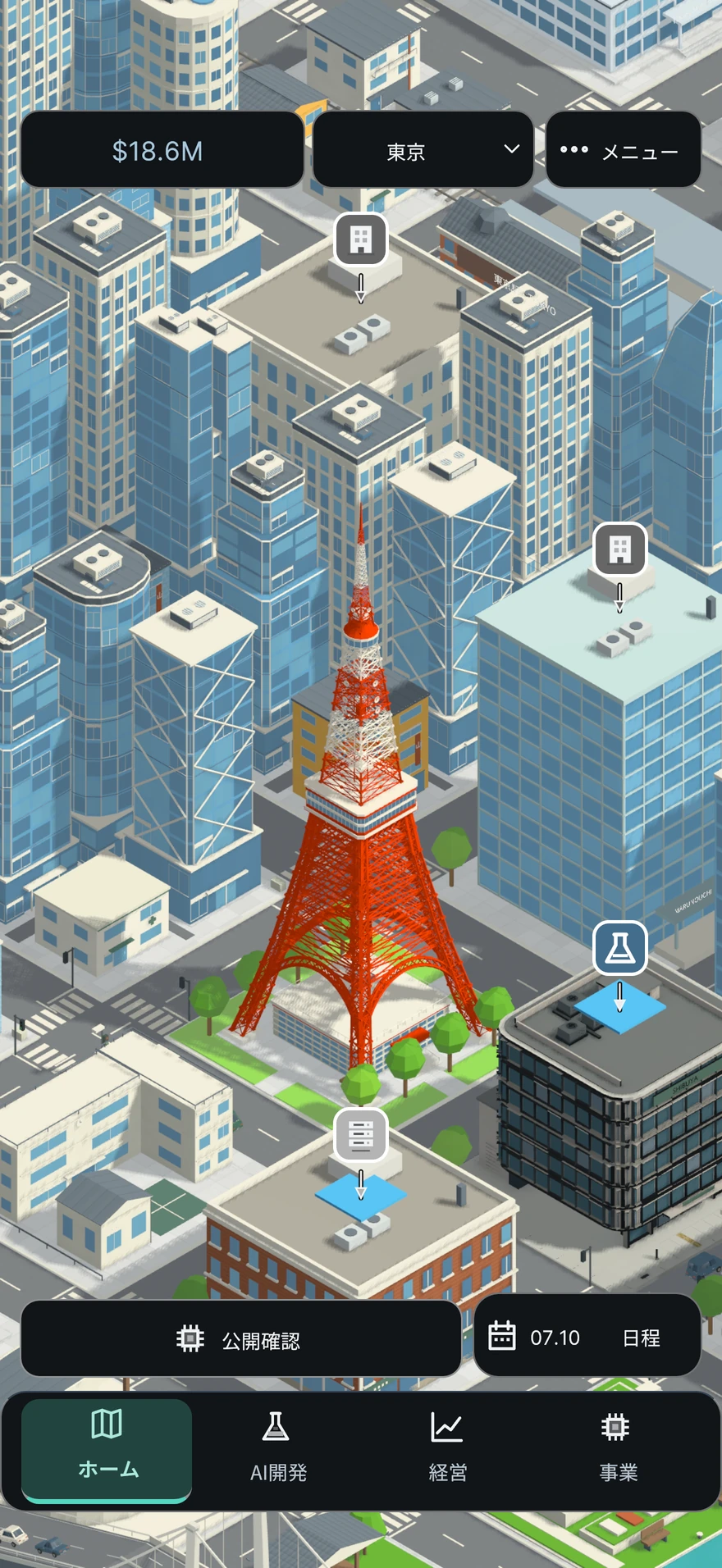
What should I compare cities and properties?
There are three-dimensional city centers and potential locations in eight cities: Tokyo, San Francisco, Seattle, London, Singapore, Seoul, Shanghai, and Paris. Compare human resources, rent, electricity, cooling, communications, and the number of seats and installation conditions for each property.
What should I compare cities and properties?
There are three-dimensional city centers and potential locations in eight cities: Tokyo, San Francisco, Seattle, London, Singapore, Seoul, Shanghai, and Paris. Compare human resources, rent, electricity, cooling, communications, and the number of seats and installation conditions for each property.
Locations that open in-game
- map
There are three-dimensional city centers and potential locations in eight cities: Tokyo, San Francisco, Seattle, London, Singapore, Seoul, Shanghai, and Paris. Compare human resources, rent, electricity, cooling, communications, and the number of seats and installation conditions for each property.
Cheap properties do not necessarily meet the required capabilities.
Initial expenses are the amount you pay today, and rent and operating expenses are the burden of continuing to run the business. We will also look at constraints such as seats and electricity. When comparing, it will be easier to read the differences if you use the same quantities, such as the same number of floors or the same size.
Before you start
- Decide what capacity you need, whether it's an office or a data center.
For example:Compare low rent and research seats
Even the cheapest option may have a high initial outlay when you add in the number of floors required and the cost of fitting it out. We will look at not only the contract fee, but also the research seat and continuing rent after the interior is completed, to see if you can start research.
Operating procedure
- Select a city and check the property on that city's map.
- If it's an office, check the initial expenditure, rent, number of seats after interior decoration, and available floors.
- If it's a data center, check the GPU installation limit, power, cooling, network, and construction period.
- Comparing candidates involves lining up two candidates with the same quantity and looking at their costs and capabilities.
- After reading the terms and conditions, decide on payment on the contract/construction confirmation screen.
Confirmation after operation
- In addition to the cost, we also check whether we can secure the necessary personnel, seats, and infrastructure.
be careful
You don't pay just to open a comparison of candidates. The city settings are in-game conditions.
There are some candidates that cannot be contracted or constructed due to the location being used, lack of funds, power transmission capacity, etc.
What are the differences between office contracts, interior design, and available seats?
The floor immediately after renting is vacant. Just paying a deposit and signing a contract will not increase the number of seats. Once you choose the use and pay the interior decoration fee, you can use the floor as a research laboratory or office.
What are the differences between office contracts, interior design, and available seats?
The floor immediately after renting is vacant. Just paying a deposit and signing a contract will not increase the number of seats. Once you choose the use and pay the interior decoration fee, you can use the floor as a research laboratory or office.
Locations that open in-game
- map
- own office
- floor
- Change the purpose of the floor
The floor immediately after renting is vacant. Just paying a deposit and signing a contract will not increase the number of seats. Once you choose the use and pay the interior decoration fee, you can use the floor as a research laboratory or office.
Convert contracted vacant rooms into usable seats
Renting a place and being able to use it for research and office work are two different things.

Left: Vacant room immediately after renting
Pay the deposit at the time of signing the contract and check the terms of the monthly rent. If a room remains vacant, the number of research and office seats on that floor will not increase.
Center: Check usage and interior costs
The laboratory supports the research desk, and the office supports the office desk. Select the usage, check the construction cost and number of seats, and confirm by clicking "Change to this usage".
Right: Match the type of seat you need
View the changed floors and number of seats for the entire company. A change of use replaces the previous use. Hiring employees and purchasing GPUs are separate matters.
Confirm in the order of contract → selection of use and payment of interior decoration costs → matching of seats and personnel. Even if the number of seats increases, work will not progress if computing resources and funds are insufficient.
Rooms, furniture, and people are metaphors that describe conditions and do not represent the number of seats or employees. This is not an explanation of how to manually place furniture or how to add automatic recruitment.
Before you start
- Check whether there is a shortage of research seats to support researchers or office seats to support engineers and sales staff.
- We will look at the deposit and monthly rent at the time of contract, and the interior decoration costs for changing the use.
- The first office contract will eliminate remote research and office seats. First, check whether you can pay the necessary interior decoration costs in addition to the deposit.
You can read the table by moving it left and right.
| Floor usage | research seat | office seat |
|---|---|---|
| vacant room | does not increase | does not increase |
| laboratory | The displayed number of seats will be added. | does not increase |
| office | does not increase | The displayed number of seats will be added. |
For example:Considering 2 floors as 1 floor with 10 seats.
If the two newly rented floors are both vacant, the number of additional seats will be 0. If you make the 1st floor a laboratory, you will have 10 research seats, and if you make the 2nd floor an office, you will have 10 office seats. After that, if you change the laboratory to an office, this base will have 0 research seats and 20 office seats. The previous 10 research seats will not remain. The numbers are for illustrative purposes only. Check the actual number of seats per floor and the total for the entire company on the game screen.
Operating procedure
- Check the purpose of each floor and the "available seats" under "Floors" in your company's office. There are no seats on vacant floors.
- Select the target floor under "Change floor usage." Select "Laboratory" for the research seat and "Office" for the office seat.
- Read the construction costs for changing the use and the number of seats after the change. Simply selecting a candidate does not result in payment or change.
- Confirm with "Change to this use" and reconfirm the target floor and the number of seats for the entire company.
- If research or learning has stopped, check not only seats but also personnel, computing resources, and funding.
Confirmation after operation
- Check to see if the target floor is now used for your chosen purpose and has more seats of the type you need.
- Compare the number of seats with researchers, engineers, and sales staff across the company and check the actual progress for the next day.
be careful
Companies without office contracts will use remote research seats 15 and office seats 15. Immediately after the first contract, both will be 0 because the room is vacant, and the research will not progress to the interior of the laboratory. Please distinguish this from adding a base to a company with an existing laboratory.
A reuse replaces a previous use. Previous interior assets will be disposed of, so check not only change costs but also records of asset disposition.
Interior design is separate from hiring employees and purchasing GPUs. Instead of counting pictures of people and equipment in the room as the number of employees and GPUs, use the displayed numbers.
How can I specialize my lab in a specific field?
Laboratory specialization helps research progress in your chosen field. It is not a facility that directly increases the number of seats or the evaluation points of the completed model.
How can I specialize my lab in a specific field?
Laboratory specialization helps research progress in your chosen field. It is not a facility that directly increases the number of seats or the evaluation points of the completed model.
Locations that open in-game
- map
- own building
- Development and expansion of bases
- Laboratory specialization
Laboratory specialization helps research progress in your chosen field. It is not a facility that directly increases the number of seats or the evaluation points of the completed model.
Specialization is a facility that helps advance research.
Increasing lab seats, speeding up research, and increasing model capabilities are different things. Specialization helps research progress in a subject area. If the target field is different, there are not enough personnel, or the project is under construction, check the operating status first.
Before you start
- Confirm that the purpose of the target floor is a laboratory.
- Check the number of researchers in the company and the areas in which they specialize.
For example:Research doesn't speed up even after specialization
If you are studying a different field, you are not in line with your specialization. First, read the target field and availability display, then look at the researchers, seats, and research allocation. Specialization alone cannot replace missing personnel or computational resources.
Operating procedure
- Choose a research field to specialize in, and read about costs, construction periods, and effects on research.
- Once the conditions are met, you can start construction by "specializing in this field".
- Advance the date and confirm the construction completion and operational status of the specialization.
Confirmation after operation
- Make sure that the field you have selected matches the field of research you are currently pursuing.
- If it is suspended, we will review the floor usage and the number of researchers across the company.
be careful
During construction to change fields, previous specializations will also be suspended. There is a total upper limit on the effects of multiple specializations.
Where can I create a joint research floor?
Adjacent offices and laboratories in the same building are used, and the interior design facilitates the progress of research and model learning. The number of seats in the office will be maintained.
Where can I create a joint research floor?
Adjacent offices and laboratories in the same building are used, and the interior design facilitates the progress of research and model learning. The number of seats in the office will be maintained.
Locations that open in-game
- map
- own building
- Development and expansion of bases
- joint research floor
Adjacent offices and laboratories in the same building are used, and the interior design facilitates the progress of research and model learning. The number of seats in the office will be maintained.
Effectiveness can be achieved by having adjacent floors and people working together.
The interior of the joint research facility is a facility that connects the office with the adjacent research lab. We look not only at whether it has been installed, but also at its current use and whether the necessary personnel are available. Read the effect of helping progress and the evaluation score of the completed model separately.
Before you start
- Make sure the target is an office and the next floor in the same building is a lab.
- We will confirm the required company-wide researchers and engineers and the interior costs.
For example:What if I change the use of the adjacent laboratory after introducing it?
It may become impossible to meet the operating conditions for joint research. After changing the use, we will check the status of the joint research floor and the progress rate. Even if there is a record of purchasing the interior, it does not necessarily mean that the current effect will continue.
Operating procedure
- Check the conditions with the neighboring laboratory on the "Joint Research Floor".
- Make the payment with "Introducing Collaborative Research Interiors".
- Check the operation display and research/learning progress magnification.
Confirmation after operation
- Check that the floor usage and required personnel are available.
be careful
This is not an addition to the evaluation score of the completed model. There is an upper limit to the effect of multiple floors.
How to expand an existing data center?
Expansion is a capital investment in existing facilities. Once construction is complete, racking, power, cooling, and network capacity will increase.
How to expand an existing data center?
Expansion is a capital investment in existing facilities. Once construction is complete, racking, power, cooling, and network capacity will increase.
Locations that open in-game
- map
- Own data center
- Development and expansion of bases
- Expand data center
Expansion is a capital investment in existing facilities. Once construction is complete, racking, power, cooling, and network capacity will increase.
Decide which constraints to extend before expanding.
Even if you have extra racks, you will not be able to fully utilize your equipment if there is insufficient power, cooling, or communication. Compare the values before and after the change to see if the conditions that are currently lacking are improved. We will also consider the timing of construction completion and GPU procurement.
Before you start
- Determine whether your current constraints are rack, power, cooling, or communications.
- We will confirm the expansion cost, construction period, capacity after completion, and funding during construction.
For example:When only the installation upper limit increases
Even if the number of GPU slots increases, if the number of GPUs you own remains the same, the number of GPUs will not increase. Furthermore, effective capacity is affected by factors such as power and cooling. We will look at the equipment value after completion, owned/operated GPUs, and effective computing resources in order.
Operating procedure
- On the expansion conditions screen, compare the capacity before and after the change.
- We will confirm the cost and begin construction.
- Check scheduled and actual completion.
- We will separately procure the necessary GPUs and review the available GPUs and allocation.
Confirmation after operation
- Once the expansion is complete, check how the installation limit and effective computing resources have changed.
be careful
Expansion does not include purchasing GPUs. Future capacity under construction should not be counted as current supply.
Recruitment, placement, and training5
Match the number of people, seats, and duties.
What should I check before hiring?
Researchers, engineers, and salespeople each have different roles. Check not only the number of people required, but also the salary, available seats, and the personnel currently secured.
What should I check before hiring?
Researchers, engineers, and salespeople each have different roles. Check not only the number of people required, but also the salary, available seats, and the personnel currently secured.
Locations that open in-game
- company
- Team/Recruitment
Researchers, engineers, and salespeople each have different roles. Check not only the number of people required, but also the salary, available seats, and the personnel currently secured.
Recruitment increases the number of people. We also need extra seats and staff.
Even if researchers are hired, if there is a shortage of research seats, they will not be able to use them for research as expected. Other practices may have staff available. First identify the reason for the shortage, then check the recruitment costs and salary after recruitment.
Before you start
- If work has stopped, check whether there is a shortage of people, seats, or funds.
For example:Research has stopped so I would like to adopt it.
If the reason for suspension is lack of researchers, we will consider hiring. If there is a shortage of research seats, we will first look at the interior, and if there is a shortage of research allocations, we will look at computational resources first. If you separate the causes before increasing the number of people, it will be easier to choose the necessary expenses.
Operating procedure
- Check the missing positions on your company's team/hiring screen.
- Look at the impact on recruitment costs and daily expenses.
- Check the number of people reserved for research seats, office seats, social work, projects, etc.
- Check the conditions, hire, and see if the shortage has been resolved based on the cause of work stoppage and usage schedule.
Confirmation after operation
- Check the available number of people and daily expenses after recruitment.
be careful
Employees are a resource for the entire company. Please do not interpret the number of seats displayed in facility comparisons as the number of employees affiliated with that facility.
How can we make use of well-known experts?
Experts have their specialties. After hiring, we check their placement and match their strengths with the actual work they will be responsible for.
How can we make use of well-known experts?
Experts have their specialties. After hiring, we check their placement and match their strengths with the actual work they will be responsible for.
Locations that open in-game
- company
- Recruitment/placement
Experts have their specialties. After hiring, we check their placement and match their strengths with the actual work they will be responsible for.
Match your field of expertise with the work you are actually responsible for
To take advantage of the strengths of experts, check their responsibilities after hiring. Rather than just looking at the increase in the number of people, we decide where we want to help in research, learning, operations, and sales and allocate them. Past achievements and future experience are two different things.
For example:Hire experts who want to help you learn
Check to see if the department in charge is in learning mode, or if the effects have stopped due to training, etc. Then look at your ongoing learning resources and progress. Don't judge your current effectiveness just by looking at your strengths on the recruiting screen.
Operating procedure
- Read the candidate's areas of expertise and employment conditions under "Recruitment/Placement."
- Confirm payment, hire, and select department.
- Check the combination with actual work such as research, learning, operations, and sales.
- In "Growth and Development," I look back on my practical experience, research and models I was responsible for, and team collaboration.
Confirmation after operation
- Make sure that the department of the hired expert matches the target work.
be careful
Merely being hired does not mean that past research results or work experience will be added.
What should I pay attention to when training, training, and guidance?
Training requires cost and time. During specialist training, professional effects and experience acquisition will be suspended, but salary will continue, so please check the balance with normal work.
What should I pay attention to when training, training, and guidance?
Training requires cost and time. During specialist training, professional effects and experience acquisition will be suspended, but salary will continue, so please check the balance with normal work.
Locations that open in-game
- menu
- Development/Team
- Employee growth and development
Training requires cost and time. During specialist training, professional effects and experience acquisition will be suspended, but salary will continue, so please check the balance with normal work.
Compare future growth with the impact on the business you are developing.
We look at not only the starting cost of training, but also the salary until completion and the period during which professional effectiveness is suspended. If you are in the middle of an important study or project, check the usage schedule to see when to send it to training and whether the remaining staff can support it.
For example:Important training and staff development overlap
Before you begin training your learning professionals, compare your expected completion to your learning expectations. Read about the effects that will become unusable during training and gain experience, and consider the cost and period of the plan to finish learning first and the plan to train now.
Operating procedure
- Read about the target employees and conditions of the training policy in "Employee Growth and Development."
- Start by checking the completion schedule, costs, and treatment during training.
- When providing instruction, confirm the placement and participation conditions of the instructor and learner.
- After completing the course, you will check your results while continuing with your actual work.
be careful
Immediate usable abilities and ongoing costs differ between plans to increase and train people. If you have important work going on at the same time, take a look at your usage schedule as well.
Although there are employees, there are not enough people available for work.
Look at the number of employees, the number of seats available, and the number of people reserved for other jobs. Researchers will need a research seat, while development and sales staff will also need an office seat.
Although there are employees, there are not enough people available for work.
Look at the number of employees, the number of seats available, and the number of people reserved for other jobs. Researchers will need a research seat, while development and sales staff will also need an office seat.
Locations that open in-game
- company
- Team/Recruitment
Look at the number of employees, the number of seats available, and the number of people reserved for other jobs. Researchers will need a research seat, while development and sales staff will also need an office seat.
Number of people, seats, and number of people available are subject to different conditions.
The number of employees is the number of people in the company, the number of seats is the capacity of the work place, and the number of usable people is the number of people who take into account securing for other work. Even if one increases, other deficiencies may remain.
Before you start
- Before increasing the number of people, open the cause of the work stoppage.
For example:Work stops even though there are a lot of people
Even if there are 10 researchers, there may not be enough research seats, or the person in charge may be reserved for another practice. Don't just make a decision based on the total number of 10 people, check the number of people and seats that can be used for the target work. Numbers are illustrative examples.
Operating procedure
- Check the number of employees in the target job category and the number of available employees.
- Check the purpose of research seats, office seats, and vacant floors.
- Look at the people in charge of social affairs, implementation support, overseas business, etc.
- Compare recruitment, interior design, and operational adjustments to eliminate any deficiencies.
Confirmation after operation
- Check to see if availability has increased for the job and progress has been recorded in the next business day.
be careful
Personnel will be shared throughout the company. The people depicted in the room are not counted as the actual number of people in the room.
Team up with two mentors to develop practical skills and masterpieces
We pair mentors with practical experience with juniors and work together on practical tasks. The effects will be fixed for the next study, and the research and models completed through participation will be left as masterpieces.
Team up with two mentors to develop practical skills and masterpieces
We pair mentors with practical experience with juniors and work together on practical tasks. The effects will be fixed for the next study, and the research and models completed through participation will be left as masterpieces.
Locations that open in-game
- company
- finance
- Business/growth
- growth
- Employee succession and masterpieces
We pair mentors with practical experience with juniors and work together on practical tasks. The effects will be fixed for the next study, and the research and models completed through participation will be left as masterpieces.
Separating the purchase of guidance and the accumulation of joint practice
An initiation fee is a payment that establishes the conditions for instruction. If you meet the placement and participation conditions for two people and proceed with the practice, the record of joint practice will increase. We also distinguish between fixed effects on next learning and the current operating state of instruction.
Before you start
- Two different technical employees are required. Read the instructor's practical experience and conditions for participation in model completion.
- Assign the instructor to learning, and assign juniors to learning or not. Check the start-up costs and daily fees.
For example:Even though I signed a contract, the number of joint practices does not increase.
First, we will confirm the placement of the two, their training/pause status, and the actual work they will be responsible for. Even if the date moves forward, if the conditions for participation are not met, you have just purchased it. Modify the conditions and look at the joint practice record for the next day.
Operating procedure
- Select the mentor and junior under "Choose two mentors and conditions."
- Read the terms and fees, placement conditions, and pay the initiation fee.
- We will proceed with the practical work that the two of you are in charge of, and confirm the number of joint practical work days and actual costs.
- At the start of the next learning session, check the results obtained and the participation conditions for both participants.
- We will look back at the completed research and models in ``The Representative Works of Two People''.
Confirmation after operation
- We will check to see if actual joint practices are increasing, not just purchases.
be careful
Startup fees are non-refundable. Purchasing alone does not increase experience points or masterpieces.
Additional placement slots will end upon suspension, termination, or expiration of the period. Past masterpieces and conditions fixed for started learning will be retained.
Research/learning/model release12
From discovery to models that are actually used.

01 CompletedCheck your learning results.

02 PublicRead the evaluation and conditions and release it to the world.
03 OfferArrange the allocation and supply of goods.
How do you choose a research topic and start?
Choose from seven research fields. Decide on the abilities you want to develop in the next model, along with the available researchers, research seats, and computational resources.
How do you choose a research topic and start?
Choose from seven research fields. Decide on the abilities you want to develop in the next model, along with the available researchers, research seats, and computational resources.
Locations that open in-game
- the study
Choose from seven research fields. Decide on the abilities you want to develop in the next model, along with the available researchers, research seats, and computational resources.
Research results and learning to create models are separate.
Research develops the foundation of technology. The results of increasing the evaluation score of the model will be confirmed as a condition for the next study. Research to improve inference efficiency also has effects that are reflected in the provision of existing models. Read the field description to find out what the research is good for.
Before you start
- Check researchers, research seats, research computing resources, and start-up costs.
For example:Create a new model after completing the research
Check the level of study completed and read the predictions and costs of your next study. Just because the research is finished, new completed models do not increase. Start learning separately and check the completed results and availability after publication.
Operating procedure
- Open "Select a research theme" or "Change theme" on the research screen.
- Compare field descriptions, current levels, start-up costs, required computational resources, and estimated time periods.
- Get started by reviewing the company implications and payment terms.
- As the days progress, we monitor progress and research efficiency. If necessary, we will suspend or review the allocation.
Confirmation after operation
- Check the selected theme and the actual progress the next day.
be careful
The period is a guideline based on current resources. If there is a shortage of personnel, seats, or computing resources, the process will be delayed or stopped.
As the level of research increases, the performance of all completed models does not automatically change.
What are the data, model size, and learning method related to?
It concerns not only performance but also learning cost, possibility of failure, and inference load and speed. Larger models may not be best in all markets.
What are the data, model size, and learning method related to?
It concerns not only performance but also learning cost, possibility of failure, and inference load and speed. Larger models may not be best in all markets.
Locations that open in-game
- the study
It concerns not only performance but also learning cost, possibility of failure, and inference load and speed. Larger models may not be best in all markets.
Design is a matter of choosing trade-offs between performance and cost.
We not only look at the high prediction performance, but also the training cost, failure probability, and inference load and speed after completion. Saving the design prepares you for the next lesson. At the start confirmation with payment, we confirm the final design, system, and data.
For example:If you are confused between a light model and a large model
Compare the likelihood of meeting application quality with the resources supporting the provision. Even if high performance is expected, operation will be difficult if the inference load is large and the supply is insufficient. You can also consider conducting small-scale experiments based on your current customers and funding.
Operating procedure
- On the model design screen, select the data combination, model scale, and learning method.
- We compare the range of prediction performance, cost, probability of failure, and computational resources.
- We review the required performance based on the application and customer conditions.
- Save the design, then review an experiment or a full-training run.
Confirmation after operation
- After saving the design, check that the full-training quote reflects your selected conditions.
be careful
Saving a design and starting paid learning are two different things. Predicted values are not a guarantee of final results.
Scale, data, and learning method of model selected by card
You can check the flow of operations on the game screen. Select an image to view it larger.
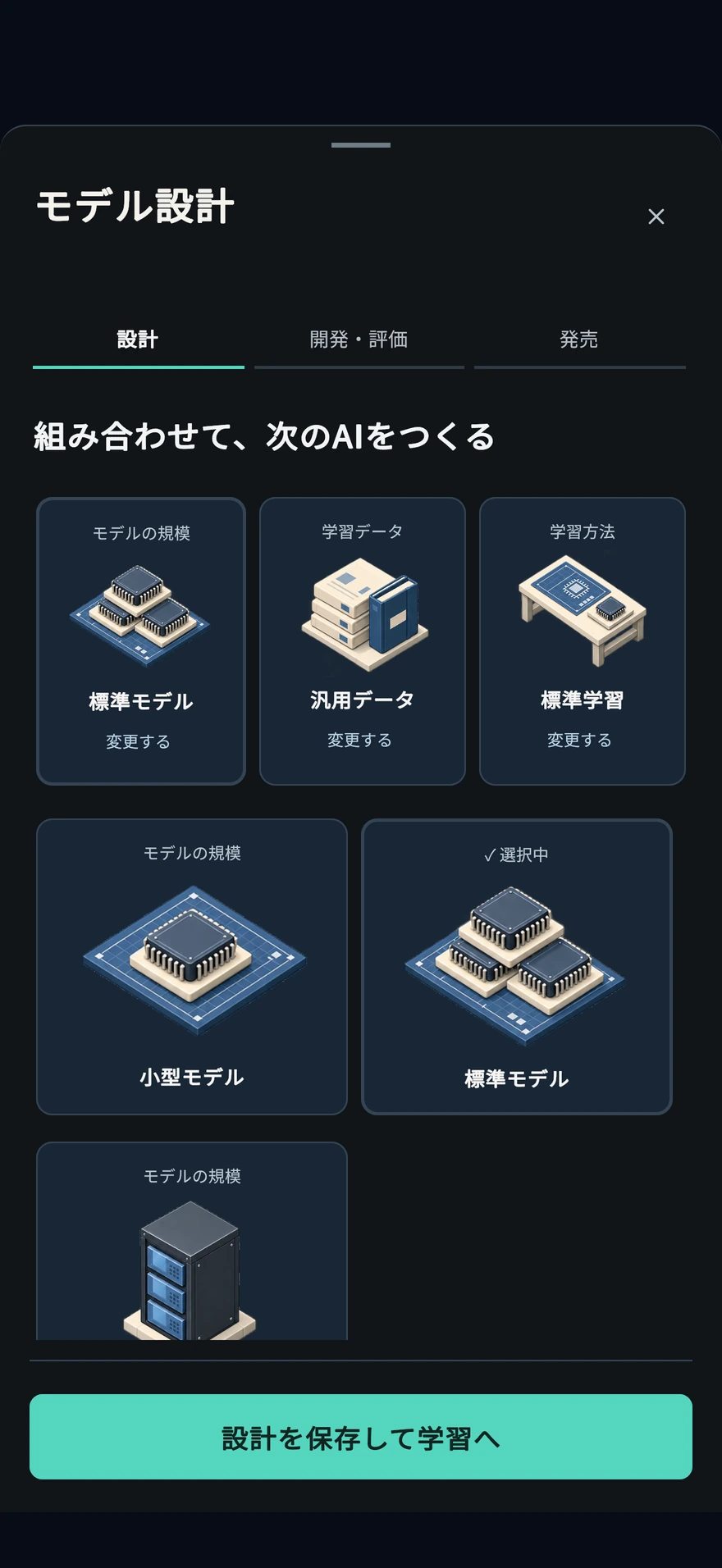
How do small experiments differ from full training?
Small-scale experiments are the stage in which you use money and resources to test your design hypotheses. Experimental results alone do not result in a complete model that can be sold.
How do small experiments differ from full training?
Small-scale experiments are the stage in which you use money and resources to test your design hypotheses. Experimental results alone do not result in a complete model that can be sold.
Locations that open in-game
- the study
Small-scale experiments are the stage in which you use money and resources to test your design hypotheses. Experimental results alone do not result in a complete model that can be sold.
Experimentation is a paid process to increase the material for judgment.
Use a small experiment to decide whether to keep or revise your design. Adopting its results still requires a separate full-training run and release before a finished model can be sold. Budget for both further experiments and full training.
Before you start
- Check the current design, experiment costs, personnel, and computational resources.
For example:If you get good intermediate results
Read the conditions for adopting the results, then check the cost and forecast for full training. A good experiment alone does not count as a release or revenue. Before another experiment, decide what to test and how much extra to spend.
Operating procedure
- Start by checking the cost and resource requirements for design and experimentation.
- Once the intermediate results are available, read the predicted and observed results.
- Decide from the displayed conditions whether to accept the results, continue, re-experiment, or discontinue.
- Before starting full training, review the adopted design and experiment results, along with the separate payments required.
Confirmation after operation
- Review the observed results and your adoption decision before proceeding to full training.
be careful
Continuing experiments or re-experimenting involves additional costs and time. Even if you cancel, please check how paid expenses will be treated.
When will model learning be completed? What if I fail?
Learning progresses according to the available personnel and learning computing resources. The completion schedule is a guideline, and the predicted range and failure probability at the start of learning are checked separately from the actual results.
When will model learning be completed? What if I fail?
Learning progresses according to the available personnel and learning computing resources. The completion schedule is a guideline, and the predicted range and failure probability at the start of learning are checked separately from the actual results.
Locations that open in-game
- the study
Learning progresses according to the available personnel and learning computing resources. The completion schedule is a guideline, and the predicted range and failure probability at the start of learning are checked separately from the actual results.
Distinguish between the range of predictions and the ability actually completed
The design, research results, parents, data, etc. at the beginning are recorded in learning. Even if the next design or research conditions change midway through, the conditions for the study that has already started will not be retroactively replaced. After completion, suitability for the application will be determined based on actual performance.
For example:The predicted upper limit was not reached.
If the prediction is 60-70 and the result is 63, it does not mean that the 70 limit guarantee has been broken. We separate the predicted range from the actual results, and also check the code, inference, safety, speed, etc. This number is an illustrative example; the actual width is shown on the start screen.
Operating procedure
- At the beginning of learning, confirm the cost, design, predictive performance, and required computational resources.
- When progress is slow, look at the cause of the work stoppage and the schedule for personnel and GPU usage.
- Once the results are available, click on "View detailed evaluation" to compare the initial predictions and the actual performance upon completion.
- If you fail, review the results and design and review the conditions for the next paid study.
Confirmation after operation
- Read the prediction at the beginning and the actual performance at the time of completion separately.
- Check to see if it is pending publication or if there are any additional decisions left after completion.
be careful
Even if you progress through the weeks all at once, you won't be able to skip resource shortages or failure conditions. A started learning design will not be rewritten with subsequent selection changes.
Development and evaluation of the completed model
You can check the flow of operations on the game screen. Select an image to view it larger.
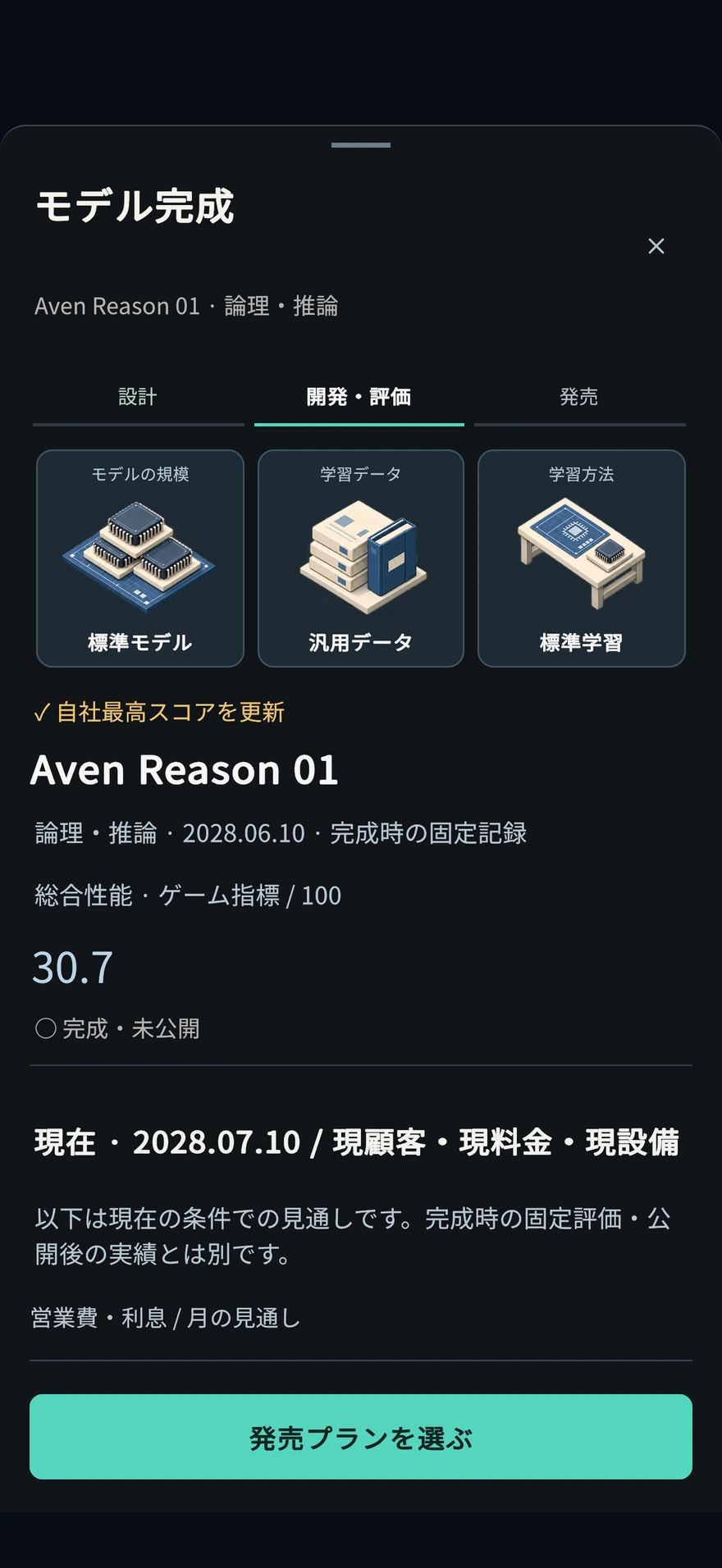
How to publish the completed model?
Training completion, model publication, and delivery to customers are separate stages. We evaluate completed models, confirm publication, and arrange distribution and supply of products.
How to publish the completed model?
Training completion, model publication, and delivery to customers are separate stages. We evaluate completed models, confirm publication, and arrange distribution and supply of products.
Locations that open in-game
- the study
Training completion, model publication, and delivery to customers are separate stages. We evaluate completed models, confirm publication, and arrange distribution and supply of products.
Completion is the state in which it has been created, and publication is the decision to use it for provision.
Evaluate the completed model and publish it if the publication conditions are met. Furthermore, for goods and services, check which model to use and how much to supply. If you look at the process separately, it will be easier to find the reason why sales have not been generated yet.
Before you start
- Once the target model has been trained, check if there are any missing conditions for publication.
For example:The product remains the old model even though it has been published
Check the offering model of the target product. For individual settings, contracts, advance provision, etc., all items will not be changed just by publishing them. Read the terms and conditions that can be changed and the supply required, and determine from the target offer settings.
Operating procedure
- Open the model results on the research side and select the completed model awaiting publication.
- Check the actual performance, usage, safety, speed, inference load, and current publishing conditions.
- If there is any necessary evaluation or deliberation, that condition will be met.
- Execute by confirming "Publish model".
- After publication, confirm the delivery model, price, budget, and supply of API products and target services.
Confirmation after operation
- Once published, review the product delivery model and allocation.
be careful
Not all products/contracts will be switched to the same model just by publishing.
Early availability, transition, and under contract models have different terms. Please check your provider before terminating your model.
How can I see all the necessary processes at once?
On the research "Model Development Process Board", you can check the status of learning, external evaluation, publication, and provision, as well as the next necessary decisions for each model.
How can I see all the necessary processes at once?
On the research "Model Development Process Board", you can check the status of learning, external evaluation, publication, and provision, as well as the next necessary decisions for each model.
Locations that open in-game
- the study
- Model development process board
On the research "Model Development Process Board", you can check the status of learning, external evaluation, publication, and provision, as well as the next necessary decisions for each model.
See “What’s left next” for each model
The process board is an entry point to read the status of learning, evaluation, publication, and provision all at once. We not only check if the progress is 100%, but also check whether the item is waiting for evaluation, waiting for publication, lack of supply, etc. Execution is performed on the original screen of the target.
For example:The model is completed but there are no sales.
Open the process of the target model and check whether it has been published or is being used in a product or service. Next, we look at the actual supply record and supply. The number of completed items and the number of items provided are not necessarily the same number.
Operating procedure
- Select the model that requires confirmation on the process board.
- Go to "Learn → Assess → Publish → Deliver" and check the completed stages and missing requirements.
- From the next operation displayed, proceed to the original screen of the target model.
- Also check the evaluation expiry and records of actual service delivery and revenue.
be careful
In "Targets of Interest", you can fix up to 3 facilities, models, and contracts to the company screen. Fixation alone will not increase performance or sales.
From obtaining permission for learning data to maintenance and use
Licensing data and paying to prepare it are separate actions. Select the prepared examples in a training plan to use them in the next full-training run.
From obtaining permission for learning data to maintenance and use
Licensing data and paying to prepare it are separate actions. Select the prepared examples in a training plan to use them in the next full-training run.
Locations that open in-game
- menu
- Development/Team
- Data assets and model genealogy
Licensing data and paying to prepare it are separate actions. Select the prepared examples in a training plan to use them in the next full-training run.
Among the approved examples, use the prepared ones for learning.
Licensing is the operation to obtain usage conditions, and maintenance is the operation to make the example usable. The number of completed data is part of the number of approved data, so they are not added together to form the total number of training data. It also separates the selection into the next plan and the start of paid learning.
Before you start
- Read the data usage agreement and license fees.
- Check the funds available for both acquisition and maintenance costs.
For example:2,000 licensed cases and 500 prepared cases
In our hypothetical example, there are 500 prepared examples to choose from for next study. This does not count as 2,500 cases. If you are additionally servicing the rest, check the new maintenance costs and look at the data you will use in your learning plan before starting. Please check the actual number and price on the target screen.
Operating procedure
- Select the target and usage conditions under "Obtain data license."
- Open "View maintenance costs and terms of use" for the acquired asset.
- Check the number and cost of new examples to be maintained this time, and select ``Pay for maintenance''.
- From "Select next learning", set the prepared data to the next learning plan.
- Review the data and design in the full-training quote before starting.
Confirmation after operation
- Check that the number of prepared examples has increased and that the target data has been selected for the next learning plan.
be careful
The performance of existing models will not be retroactively changed. The more examples there are, the more gradual the additive effect becomes.
What changes when you partner with your customers for data?
Agree to the terms and conditions and collect licensed examples from real offerings. There are separate stages until you select an example that has been prepared for a fee for the next study.
What changes when you partner with your customers for data?
Agree to the terms and conditions and collect licensed examples from real offerings. There are separate stages until you select an example that has been prepared for a fee for the next study.
Locations that open in-game
- menu
- Development/Team
- Data assets and model genealogy
- Data partnership with customers
Agree to the terms and conditions and collect licensed examples from real offerings. There are separate stages until you select an example that has been prepared for a fee for the next study.
Data collaboration: Separating agreement, accumulation, and maintenance
Mere agreement does not provide examples. We will continue to provide it, maintain it, and use it for the next study.

Left: Agree to terms and fees
Review the scope of your customer's permissions, start-up costs, and future discounted contract fees. It is one thing to agree to a partnership and another to actually accumulate examples.
Center: Accumulate from actual offers that meet the conditions
Licensed examples will accumulate from the day after the agreement is reached and from the day the SLA is met and the product is actually delivered. It doesn't necessarily increase just by increasing the number of days.
Right: Prepared for a fee and selected for next study
Review, anonymize, and deduplicate the new examples. Then choose the prepared data asset and check the cost and conditions before starting the next full-training run.
Refurbished examples are included in the total number licensed. The performance of existing models does not change simply by choosing a partnership, maintenance, or learning plan.
Paper and document boxes are metaphors to describe the state of permission and maintenance. The sum of the gray and blue contents does not represent the total number, and the number of people/sheets does not indicate the number of customers or the actual number of cases. This is not the time to collect confidential or personal information unconditionally.
Before you start
- An ongoing customer agreement is required.
- Review startup costs, explicitly permitted example usage coverage, and future discounted monthly subscription fees.
You can read the table by moving it left and right.
| Number of views | meaning | In this hypothetical example |
|---|---|---|
| Permitted example | The total number accumulated by agreeing to the terms of use. Including those that have been serviced | 150 cases |
| Refurbished example | Of the total number, the amount that has been completed | 100 cases |
| New example to be developed this time | The remaining amount after subtracting the number that has been maintained from the total number of approved items. | 150 − 100 = 50 examples |
For example:100/150 is not a total of 250 cases
Of the 150 cases, 100 have been serviced, and the remaining 50 can be serviced next. Without additional accumulation, the display after paid maintenance of these 50 examples is 150/150. Maintenance will not increase the total number. The numbers are provisional examples to explain how to read the display, and are not actual accumulation numbers or performance results.
Operating procedure
- Compare the monthly contract fees, start-up costs, and terms of use before and after the agreement in "View data alliance conditions" of the applicable contract.
- Read the terms and conditions and select ``I agree to the terms and conditions.'' Immediately after the agreement, examples from the offer have not yet accumulated.
- We will continue the actual provision from the next day onwards, and check the ``actual provision that meets the SLA'' and the ``prepared/licensed example.'' The number of cases will not increase just because there is a contract or the number of days has passed.
- Under "View maintenance costs and terms of use", read the number and cost of "new examples to be maintained this time" and select "Pay for maintenance". Check, anonymize, and remove duplicates from the examples that have been approved.
- Under “Select for next training”, choose the prepared data asset, then save the plan with “Save and go to full training”.
- Review the data, cost, and compute in the full-training quote before starting. Saving a plan alone does not start full training.
Confirmation after operation
- Refurbished examples are included in the total number licensed. The two displays are not added together.
- Check whether the data name and number of prepared examples recorded at the start of learning are the intended contents.
be careful
Future monthly subscription fees will be reduced on agreed terms. Past sales will not be changed. Even after the contract ends, you can still use the acquired examples within the scope of the agreed permission.
Partnerships, data preparation, and plan selections do not change already completed models. Full training records the prepared example count at its start; examples prepared later are not added to that run. To use additional examples, check the plan and count for the next training run.
The game's terms and conditions ensure that only anonymized and verified examples that have been explicitly authorized by the customer are used for training. Collection and redistribution of personal/confidential information is not permitted.
Select derivation and LoRA additional learning from the parent model
Select the parent model, learning purpose, and prepared data, and transfer the strengths and weaknesses to the next model. Depending on the method, the handling of learning costs and load during provision will vary.
Select derivation and LoRA additional learning from the parent model
Select the parent model, learning purpose, and prepared data, and transfer the strengths and weaknesses to the next model. Depending on the method, the handling of learning costs and load during provision will vary.
Locations that open in-game
- menu
- Development/Team
- Data assets and model genealogy
- Select the next model lineage
Select the parent model, learning purpose, and prepared data, and transfer the strengths and weaknesses to the next model. Depending on the method, the handling of learning costs and load during provision will vary.
There is a difference between inheriting from your parents and making the model lighter.
In addition to derivations for lightweight, corporate, and code, you can choose "additional learning with LoRA." LoRA in the game keeps the inference load, speed, inference cost, and context length at the time of provision from the starting parent while suppressing the learning resources. Don't think that just because the learning is light, the delivery is also light.
Before you start
- Check the models owned by our company that parents can choose from, and the prepared data.
- LoRA requires a parent model and prepared data. Use the standard model size and architecture, and do not choose efficiency as the full-training focus.
For example:Cannot save if LoRA is selected
Choose a parent model your company owns and a data asset with licensing and paid preparation completed. Reset model size and architecture to standard. For full training, choose general, code, reasoning, or safety; efficiency is unavailable. Resolve unmet requirements and review cost and forecasts before starting.
Operating procedure
- Choose a new lineage without a parent, or training that uses a parent model.
- When using a parent, select a lightweight/corporate/code derivative or "Additional learning with LoRA" and read the exchange conditions between the parent's performance/safety and learning method.
- Select the prepared data to use. LoRA cannot start without data assets.
- Save the plan with “Save and go to full training”, then review the full-training cost, forecast, and unmet requirements before starting.
- After completion, look back at your family tree and your actual ability, inference load, and speed.
Confirmation after operation
- Check whether the parent, purpose, and data recorded at the start of learning are the intended combination.
- In the completed model of LoRA, we will check how to maintain the parent's inference load, speed, inference cost, and context length at the start.
be careful
A strong parent model does not guarantee success. Saving the plan and starting paid full training are separate actions.
Record parent information and prepared examples at the start of the study. Even if you change the parent's name or add data after that, the record of started learning will not be rewritten.
How can I provide new models to some customers in advance?
Keep the old version and provide a trial version to some customers to compare actual cancellations, provision quality, calculation usage, and sales. Advance offer is limited to one item at a time.
How can I provide new models to some customers in advance?
Keep the old version and provide a trial version to some customers to compare actual cancellations, provision quality, calculation usage, and sales. Advance offer is limited to one item at a time.
Locations that open in-game
- menu
- Development/Team
- Advance model provision
Keep the old version and provide a trial version to some customers to compare actual cancellations, provision quality, calculation usage, and sales. Advance offer is limited to one item at a time.
Compare the actual offer of the old version and trial version for the same product
We monitor not only prediction scores, but also churn, quality, calculation usage, and sales. Because supply shortages and market changes also affect the difference, we read the number of observation days and the number of customers together. You can decide for yourself whether to migrate even after the observation is completed.
Before you start
- Have a completed new model and products to meet the required number of customers.
- Review setup costs, test allocations, observation periods, and supplies supporting both models.
For example:If trial version customers seem likely to stay
Check the records for how many days and people, and what the supply was like during the same period. Improvement cannot be determined based on just a small number of differences. We will also read about the resources required after migration and compare full migration, additional observations, and maintaining the old version.
Operating procedure
- Select the product and test model under "Provide in advance to a small number of people".
- Read the terms, pay the setup fee and get started.
- We will actually provide the food from the next day and check the daily records.
- After observation, you can decide whether to ``transfer this product to the trial version,'' ``observe for XX more days,'' or ``revert to the old version.''
Confirmation after operation
- Check the observed days, number of customers, and common supply rate for the values you are comparing.
be careful
During the exam, the model and price of the target product and application for large contracts will be fixed. It will not automatically migrate just after the observation ends.
Since it also includes a small number of customers and market changes, it is not possible to conclude the effectiveness of the model based on the differences alone.
Start/end maintenance of public model
Maintenance uses setup and daily costs to support operational reliability during delivery. Check eligible models and ongoing costs.
Start/end maintenance of public model
Maintenance uses setup and daily costs to support operational reliability during delivery. Check eligible models and ongoing costs.
Locations that open in-game
- company
- finance
- Business/growth
- business
- Model maintenance and customer migration
Maintenance uses setup and daily costs to support operational reliability during delivery. Check eligible models and ongoing costs.
Maintenance is not a process of rebuilding capabilities, but operation support.
We separate the effectiveness of maintenance from the performance evaluation of the model itself. Check which models are on offer and need to continue to maintain them, as there will be set-up fees followed by day-to-day costs. The number of customers and fees are other considerations.
Before you start
- Review published and available models and starting conditions.
For example:Maintenance costs for older models continue
Check if there are any products, contracts, or customers in transition that use that model. Read the implications and decide if you want to stop maintaining an older version that is in use. Simply releasing a new model does not necessarily mean that all provision and maintenance of the old version will end.
Operating procedure
- Select the target in "Select model to maintain".
- Read about setup costs, daily maintenance costs, and operational effects.
- Execute with "Pay setup fee and start maintenance".
- Check the number of models under maintenance and the cumulative cost.
- To end maintenance, check the impact on the recipient and select "End maintenance."
Confirmation after operation
- See which models have ongoing maintenance, along with their daily costs.
be careful
This is not an operation to increase the number of customers or contract fees. Distinguish between providing model performance evaluation and operational reliability assistance.
Migrate contract customers to new version/terminate old version
We will continue to provide the old version while validating the new version with additional inferences. Even if the achievements are completed, it will not switch automatically. Finally, choose whether to migrate to the new version or continue with the old version.
Migrate contract customers to new version/terminate old version
We will continue to provide the old version while validating the new version with additional inferences. Even if the achievements are completed, it will not switch automatically. Finally, choose whether to migrate to the new version or continue with the old version.
Locations that open in-game
- company
- finance
- Business/growth
- business
- Model maintenance and customer migration
We will continue to provide the old version while validating the new version with additional inferences. Even if the achievements are completed, it will not switch automatically. Finally, choose whether to migrate to the new version or continue with the old version.
Validating the new version and migrating customers are separate stages.
Verify the previous version while providing it, and choose the version after looking at the track record.

Left: Verifying the new version while continuing with the old version
Gray represents the old version, blue represents the new version. Maintain both and serve customers with the old version while validating the new version with additional inferences. Both use the same inference resources.
Center: Read the results on days when conditions were met
Check the customer SLA, verification-side SLA, contract revenue, and compute used for verification. Time alone does not advance progress: only days of actual service that meet the conditions count.
Right: Choose whether to migrate or continue with the old version
Once you have the necessary results, you will be placed on the waiting list for a decision. Select ``Move this customer to the new version'' or ``Continue providing the old version.'' Automatic migration will not be performed just by completing the track record.
The number of customers and contract rates will remain the same after the migration. Retirement of old versions is a separate decision. It cannot be abolished while it is being used for other provision, business, verification, or development.
The color of the file is a metaphor for distinguishing between the two versions, and does not indicate superiority or inferiority. The number of people and forms is not the number of customers or the number of days required. The one on the right is a judgment scene, not a scene where switching to a new version or success has been determined.
Before you start
- Requires an ongoing contract with qualifying live delivery and revenue, and a different published destination model.
- Maintain both old and new versions and fix and then validate the current offering version of the Covered Agreement.
- Review preparation costs, additional inference demands, required delivery experience, SLA, validation deadlines and remaining contract term. The destination must meet the customer's performance requirements.
| situation | Serving customers and compute |
|---|---|
| Under verification | The same inference resources provided in the old version are used for additional verification in the new version. |
| Waiting for decision on migration | The provision of older versions and the demand for additional verification will continue. You cannot switch just by meeting the required achievements. |
| After selecting Migration/Continue | Offered in selected editions, additional verification requirements are terminated. Retiring a previous version is a separate operation. |
For example:Even after 4 days have passed, the results are not necessarily the same as those for 4 days.
Let's assume that the required performance is 3 days worth. If 1 day out of 4 days does not meet the provision conditions, only 3 days worth of achievements will be counted. Even after we have what you need, we will continue to provide you with the old version until you choose to migrate. The numbers are examples to explain the mechanism; please check the actual number of days required on the target confirmation screen.
Operating procedure
- From "Choose a model to maintain", start maintenance for both the current provision model and the destination model.
- Fix the old version using "Fix the current version" in the applicable contract. If it is already fixed, check the provided model.
- Select the migration destination under "Verify migration to new version", read the terms and fees, and select "Verify compatibility by paying preparation fee".
- Review SLAs to customers, target validation SLAs, actual contracted revenue, and validation calculation usage in Day-by-Day Actual Delivery and Compatibility.
- When it becomes ``Waiting for migration decision,'' select ``Migrate this customer to the new version'' or ``Continue providing the old version.''
- After making your selection, confirm that the target customer's offering and additional validation requirements are closed.
- If you want to discontinue the old version, check if it has been used by other providers, customers, businesses, verification, and development, and then proceed with the operation to terminate usage.
Confirmation after operation
- Verify that the customer offering is the intended model and maintains customer counts and contracted rates.
- Check to see if there are any pending decisions or if there are any additional verification requests remaining.
be careful
Days that do not meet the conditions will not be included in the required achievements. Even if the verification ends due to contract termination or lack of performance by the verification deadline, it will not be automatically migrated.
If a pre-offering comparison is in progress, you must complete that decision first.
The number of customers and contract fees will not increase with the migration. Even if you migrate one customer, you cannot retire the old version if it is used elsewhere. Records of company history and model genealogy will remain.
API/Service/Customer8
We deliver a combination of performance, price, and supply.
How do you decide on the allocation to API products?
Establish published delivery models, pricing, and inference budgets for each market. We look at not only the model's performance, but also the application quality required for that market and the supply that supports demand.
How do you decide on the allocation to API products?
Establish published delivery models, pricing, and inference budgets for each market. We look at not only the model's performance, but also the application quality required for that market and the supply that supports demand.
Locations that open in-game
- the study
- model
Establish published delivery models, pricing, and inference budgets for each market. We look at not only the model's performance, but also the application quality required for that market and the supply that supports demand.
View models, prices, and inferred budgets as a combination
The model is related to usage quality, the price is related to customers and sales, and the inference budget is related to the available capacity. Look at the current demand and inference resources of the entire company without changing just any one thing. Separately check the budget for the product and the amount actually used.
Before you start
- Review published models and current inference supply.
For example:There is surplus capacity for one product, and there is a shortage of another product.
Don't assume that the free budget will automatically go to the missing items; instead, check the allocation of each item. After the change, we will look at the supply and actual sales. If the inference resources of the entire company are insufficient, it will not be possible to support the entire demand simply by moving between products.
Operating procedure
- Open "Determine product allocation" on the model screen.
- Compare the models offered and usage conditions for each market.
- Determine your rates and inferred budgets and see the impact on your company's overall supply and bottom line.
- As the day progresses, see changes in customer numbers, sales, supply sufficiency, and cancellations.
Confirmation after operation
- Check the product provision model, price, budget, and next day supply and actual sales.
be careful
Unused product budget may not be automatically allocated to other products. Adjust allocation by looking at both surplus and shortage.
Why aren't the number of customers increasing even though the performance is high?
Acquiring and retaining customers involves performance, price, reliability, reputation, sales, competition, and supply that suit the application. The overall performance of the model alone is not the deciding factor.
Why aren't the number of customers increasing even though the performance is high?
Acquiring and retaining customers involves performance, price, reliability, reputation, sales, competition, and supply that suit the application. The overall performance of the model alone is not the deciding factor.
Locations that open in-game
- the study
- model
Acquiring and retaining customers involves performance, price, reliability, reputation, sales, competition, and supply that suit the application. The overall performance of the model alone is not the deciding factor.
Look not just at the number of customers, but also at recurring revenue.
Even if new acquisitions increase, business does not necessarily improve if cancellations and expenses increase. Look at the application quality, price, supply, and reliability of your target market and compare acquisitions, cancellations, and actual sales after changes over the same period.
For example:If you increase the number of customers by lowering prices
In addition to the number of customers, check sales per company, total sales, surplus supply capacity, and profit. Costs may also increase to meet increased demand. Next week's records will determine whether you can continue to support the increased number of customers.
Operating procedure
- We will check whether the usage quality and price match the market.
- Check API supply sufficiency and reliability, notification of shortages and incidents.
- We look at sales and team conditions, social response and reputation, and competitor movements.
- Don't make too many changes at once, and look back at your actual acquisitions, cancellations, and sales on a weekly basis.
be careful
Even if lower prices increase the number of customers, sales and profits per company may fall.
What is the difference between small and large models?
Normally, the setting is to leave some of the simple API requests to the small size, and keep the large size for complex requests. The amount of calculation, usage quality, reliability, continuation rate, and sales by model will vary.
What is the difference between small and large models?
Normally, the setting is to leave some of the simple API requests to the small size, and keep the large size for complex requests. The amount of calculation, usage quality, reliability, continuation rate, and sales by model will vary.
Locations that open in-game
- the study
- model
- Differently use small and large API requests
Normally, the setting is to leave some of the simple API requests to the small size, and keep the large size for complex requests. The amount of calculation, usage quality, reliability, continuation rate, and sales by model will vary.
We also need people and money to continue using them differently.
When going small, you need to meet the minimum quality and operational requirements of the market. On days when we don't have enough engineers or operating funds, we go back to the large scale, so we read the set ratio and the actual ratio separately.
Before you start
- We will prepare two published in-house models and check whether the smaller version requires less calculation than the currently available version.
For example:Calculation demand increased after setup
Check with the person in charge to see if the funds were used on that day. If we return to large size, demand will increase compared to the assumption that small size will be in charge. We will look at the surplus capacity that can support provision even if it is large, and the conditions that will allow us to maintain different uses again.
Operating procedure
- Open "Use API requests separately for small and large" and select the market and small model.
- Make sure that both models are published in-house models and meet the minimum quality on the market.
- Check the amount of small-scale calculations, engineers in charge, setup costs, actual operating costs, and the proportion of work to be delegated.
- After setting, check the calculation amount and supply on the days you actually use them.
Confirmation after operation
- Check the actual responsibility ratio, supply, operating costs and actual sales of the small size.
be careful
On days when we don't have enough staff or operating funds, we revert to large-scale operations and demand for calculations increases.
This is a setting for normal API. The same settings do not apply to fixed contracts, large projects, advance provision, and in-house services.
Before changing the large size currently available or retiring the small size, check the cancellation conditions for different uses.
What is the difference between your own services such as AI search and API?
AI search, development support, and business assistant are in-game businesses that use our own models. Apart from the API product, check the starting conditions, person in charge, calculation demand, cost, usage, and sales.
What is the difference between your own services such as AI search and API?
AI search, development support, and business assistant are in-game businesses that use our own models. Apart from the API product, check the starting conditions, person in charge, calculation demand, cost, usage, and sales.
Locations that open in-game
- the study
- model
AI search, development support, and business assistant are in-game businesses that use our own models. Apart from the API product, check the starting conditions, person in charge, calculation demand, cost, usage, and sales.
View both the profitability of each service and the company's overall surplus capacity
Our own services also have personnel, inference demands, and ongoing costs. In order to share APIs and research and resources, before starting, we will check the usage plan to see if it can support existing business in addition to the prospects for the service alone.
For example:API supply decreased after new service started
Check to see if the demand for your services is using up your company's overall inference resources. Look at total demand, inferred allocation, personnel, and daily expenses and compare allocation changes and additional procurement options. Just making the initial payment doesn't necessarily mean you can continue.
Operating procedure
- From the Business/Growth screen, open the conditions for the target service.
- Check the model to be used, application quality, required personnel, supply, initial cost and operating cost.
- Once started, we will look at actual usage, sales, and load on shared resources.
- If resources are also needed for APIs and research, review allocation and total demand.
- For monthly plans and continuous agents, open the dedicated section of "Business" and check the usage quota, renewal fee, connection permission, waiting for approval, and activity history.
be careful
This is not an operation to contract for a real AI service. It does not mean that all future sales will come in at the moment the service starts.
What should I be careful about when negotiating with large-scale projects and clients?
Read the conditions for application and order acceptance and the conditions for provision after acceptance of the order separately. Contracts have conditions such as usage quality, SLA, computational demands, fees, deadlines, and implementation support.
What should I be careful about when negotiating with large-scale projects and clients?
Read the conditions for application and order acceptance and the conditions for provision after acceptance of the order separately. Contracts have conditions such as usage quality, SLA, computational demands, fees, deadlines, and implementation support.
Locations that open in-game
- the study
- model
Read the conditions for application and order acceptance and the conditions for provision after acceptance of the order separately. Contracts have conditions such as usage quality, SLA, computational demands, fees, deadlines, and implementation support.
The conditions for receiving an order are different from the conditions to be followed after receiving the order.
SLA is the condition of the quality of delivery required in the contract. Even if you are successful at the time of application, you will need to continue to provide computing resources, personnel, and funds. The monthly fee is not counted as income for the entire fixed term.
For example:Before applying for a big contract
Consider the resources used by existing products and contracts, as well as the demand for new contracts and implementation support. We check not only the required quality and deadline, but also the available capacity after the start of provision. After receiving an order, we check the actual provision, sales, SLA and renewal status.
Operating procedure
- Check the application deadline, application fee, required models and achievements.
- We will estimate the supply, personnel, and ongoing costs after receiving an order, along with the existing business.
- If you need specialized features or implementation projects, check for additional research and practice requirements.
- During the contract, check the actual delivery date, sales, expiration date, and renewal or cancellation status.
be careful
Just receiving an order does not guarantee sales for the entire period. Continuing supply shortfalls may affect contract maintenance.
Proceed from demonstration implementation to the next scope of implementation
We confirm the required quality and SLA through continuous actual delivery. Once you achieve a stage, you can choose the next investment, but the scope of implementation will not automatically expand.
Proceed from demonstration implementation to the next scope of implementation
We confirm the required quality and SLA through continuous actual delivery. Once you achieve a stage, you can choose the next investment, but the scope of implementation will not automatically expand.
Locations that open in-game
- company
- finance
- Business/growth
- business
- Large project
We confirm the required quality and SLA through continuous actual delivery. Once you achieve a stage, you can choose the next investment, but the scope of implementation will not automatically expand.
Separate demonstration, continuous actual provision, and next investment
Start preparations, check the actual offers that meet your requirements, and then choose the next scope of implementation.

Left: Check the conditions and preparation costs and start
Read the model, confirmation method, required quality/SLA, number of continuous days, capacity and maintenance cost. After paying the preparation fee, the demonstration begins. Payment is not a substitute for qualifying performance.
Center: Count days when conditions are met consecutively
During verification, we will confirm that the actual delivery meets both the required quality and SLA. Consecutive achievement returns to 0 on days when conditions are not achieved. This is different from the number of days that have passed or the total number of good days.
Right: Compare the following ranges and decide on new investments
Once you complete the stage, you will be waiting for a decision. Compare standard and reduced range models, capacity, quality/SLA, costs and sales, and proceed with new preparation costs. It will not automatically expand just by achieving it.
Pending judgment, current coverage and costs will continue while work and assessment requirements are met. Proceeding to the next stage and ending the offer are two different operations.
People, forms, and files are metaphors to explain stages and do not represent the actual number of customers, number of days required, or number of locations. The two colors distinguish between candidates and do not indicate superiority or selected status. The picture on the right is a scene where investment decisions are being made, not a scene where the scope of implementation has expanded. Continuation of provision also requires operational and evaluation conditions.
Before you start
- Find out which completed in-house models we can provide, preparation costs, required inference capacity, and daily maintenance costs. The first demonstration begins with the standard range.
- Read "Confirmation method in business". In ``human-checked business support,'' the customer's person in charge makes the final decision. “Conditional automatic processing” requires a valid acceptance rating for the model and the required safety/evaluation range.
You can read the table by moving it left and right.
| Actual delivery day | Required quality and SLA | Number of consecutive days achieved |
|---|---|---|
| Day 1 | satisfy both | 1 day |
| 2nd day | satisfy both | 2 days |
| 3rd day | does not satisfy either | Return to day 0 |
| Day 4 | satisfy both | 1 day |
| Day 5 | satisfy both | 2 days |
| Day 6 | satisfy both | 3 days → Waiting for next stage decision |
For example:Instead of adding up the good days, count the consecutive days.
In this example, if the goal is not reached on the third day, the streak will return to 0. Start counting again from the 4th day and achieve 3 days in a row on the 6th day. We do not judge based only on the fact that 6 days have passed or that there are 5 days in total that meet the conditions. The required number of days is a provisional value for explanation. In reality, the conditions displayed on the confirmation screen for that matter/stage are used.
Operating procedure
- In "Choose a new demonstration implementation", select the customer, "current provision model", and confirmation method.
- Read the required quality, SLA, number of consecutive days, preparation cost, capacity and maintenance cost, and select "Pay preparation fee and start demonstration". Payment alone does not achieve a stage.
- Continue the actual provision from the day after the start, and check the ``actual provision that has continuously met the conditions'' and ``the most recent SLA/daily sales.'' In the "Record of introduction conditions and stages", you can read the usage quality and the most recent conditions not met.
- Once the required number of consecutive days has been met and the status is "Waiting for next stage decision", open "Determine next implementation" for the target customer.
- Select the next stage model and confirmation method, and compare the capacity, required quality, SLA, cost, and sales for each range using "Compare standard and reduced estimates." A reduced scope will reduce the burden, but the number of locations and sales at full price will also be smaller.
- Check the conditions and start the next step by "Pay the preparation fee and install". The number of consecutive days of achievement of that stage is recorded starting from 0.
- If the provision has stopped, open "Determine whether to reintroduce". Check the missing models, capacity, and evaluation conditions, and decide whether to pay a new preparation fee and repeat the same step, or terminate the offer.
Confirmation after operation
- Check the implementation scope, provision model, number of consecutive days of achievement at this stage, and actual sales. The number of implementation locations is usually separate from the number of API customers.
- "Monthly sales at full amount" is not necessarily the same as the actual deposit amount. Read the conditions under which the amount will be reduced due to supply shortages, quality/SLA failures, and daily sales.
be careful
If there is a day when the quality/SLA conditions are not met during verification, the continuous achievement will return to 0. If the conditions are not met for the grace period, the provision will be stopped.
Pending a decision, we will continue to provide services within our current scope while meeting operational and evaluation conditions. Inferred demand and maintenance costs will follow, and actual sales will vary based on supply and delivery conditions. At the stage of new introduction, in addition to the reduction for the supply shortage, the sales rate for the days when the required quality and SLA are not achieved will also be applied. Please check "Sales on days when quality/SLA is not achieved" and daily sales. Stages started in the past keep the billing terms saved at that time. You cannot expand by simply choosing the next stage; you will need to pay a new preparation fee.
Conditional automatic processing stops automatic processing and sales when the rating expires. Even after the re-evaluation is completed, a judgment will be made based on whether the updated evaluation will be reflected in the operation. Simply updating the evaluation will not solve the capacity shortage.
Even if we reach the final stage, we will continue to provide paid services within the current scope. If you select ``Terminate provision of this project'', the provision, sales, inference demand, and maintenance costs will be terminated. Preparation fees paid will not be refunded, and past stages and results will remain.
Preparing for overseas expansion and starting provision are separate stages
Pay the entry fee, proceed with language support, and choose to start providing after preparations are complete. A new region starts with zero customers, and customers and sales will not increase just by completing the preparations.
Preparing for overseas expansion and starting provision are separate stages
Pay the entry fee, proceed with language support, and choose to start providing after preparations are complete. A new region starts with zero customers, and customers and sales will not increase just by completing the preparations.
Locations that open in-game
- company
- finance
- Business/growth
- growth
- Overseas regional market
Pay the entry fee, proceed with language support, and choose to start providing after preparations are complete. A new region starts with zero customers, and customers and sales will not increase just by completing the preparations.
Overseas expansion: Preparation, waiting to start, actual provision
Even though the preparations have been completed, the service has not yet started. Check the costs and terms and choose to start.

Left: Prepare with personnel who can actually handle the task.
We pay entry and language support fees and secure HQ engineers and sales personnel. Actual preparations will begin on the day when the personnel, model conditions, and daily funds are in place. The number of days that have passed is not enough.
Center: After preparations are complete, select to start providing the service.
The initial wait list has 0 customers and 0 sales. Local support costs and HQ allocations will continue. It will not be provided automatically until you select "Start provision (no additional cost)".
Right: Check the performance after providing
You still have zero customers immediately after starting. From the next day, review actual SLA, capacity, cash, model, and pricing conditions. Customer and revenue growth are not guaranteed; local support, electricity, and other costs still apply.
There is a difference between no additional start-up costs and no operating costs. International regional customers are typically separated from API customers to ensure shared headcount and inference capacity as well.
People, paper, and PC are metaphors to explain the stages, and do not represent the number of people required, number of days, or number of customers. A closed PC indicates a waiting period, and an open PC indicates operations after the start. This is not an explanation of opening/closing the PC in the game or adding automatic start of provision.
Before you start
- We prepare in-house models that meet local application quality, specialized performance, safety, and SLA requirements.
- We will confirm the allocation of HQ engineers and sales staff that does not overlap with other businesses, expansion and language support costs, and ongoing local support and electricity costs. HQ is the head office personnel.
You can read the table by moving it left and right.
| situation | customers and sales | Costs and next steps |
|---|---|---|
| Localizing | 0 customers, 0 sales. Accumulate actual working days | Local support costs and HQ allocation are required. Preparation will proceed on the day the conditions are met. |
| Ready · Select start offering | 0 customers, 0 sales. Does not start automatically even if you advance the number of days | Local support costs and HQ allocations will continue. Explicitly choose to launch with no additional launch costs |
| Currently being provided to the region | Immediately after the start, there were 0 companies. Confirm customers and sales through actual delivery from the next day onwards | Local support, regional power according to actual supply, common inference capacity and HQ personnel are required. |
For example:What you need is actual working days, not elapsed days.
This is a hypothetical example that requires 3 working days to prepare. Work is done on the first day and preparation takes one day, and if there is a shortage of personnel on the second day, it remains one day. If you work on the third and fourth days, the actual preparation will be completed in two or three days. Instead of going back to 0 for days you're short on, accumulate the days you've advanced. Even after completion, your first local customers and sales will be 0 until you choose to start offering. The actual number of days and personnel required can be confirmed on the confirmation screen for the target area.
Operating procedure
- Check the expansion costs for the target region by selecting "Select region" or "Differences between three regions".
- Select ``In-house model provided'' and ``Regional monthly fee for one company'', and read the entry fee/language support fee, required number of working days, HQ personnel, usage quality, and SLA.
- Check the displayed amount and conditions, and select the "Prepare for Advancement" payment button. There are still 0 customers in the new region.
- Check the number of "actual preparation" days from the next day onwards. Language support will proceed on the day when the personnel, model conditions, and daily funds are available. The days you don't have enough will not progress, and the accumulated actual working days will remain.
- When "Ready - Select to start provision", check the personnel and model conditions and select "Start provision (no additional cost)". Provision will not start just by waiting.
- Check “Currently delivering to region” and view local customers from the next day onwards, recent SLA and sales. In "Conditions/Benefits", you can check local support/power, actual estimated supply and demand, and "Records of actual business operations."
- You can choose to suspend, resume, or withdraw from "Conditions/Benefits and Expenditures". Read and determine resumption costs, remaining customers, future costs, and whether refunds are available.
Confirmation after operation
- Distinguish between ready and delivery, and check the status of target areas and track record after launch.
- Regional customers are usually separate from API customers. Inference equipment and HQ personnel are shared with other businesses.
be careful
"No additional cost" for launch means there is no additional charge for the launch operation. Local support costs for preparation, waiting to start, and provision are recorded daily separately from HQ salary and paid at the end of the month. You will also need to pay for the local electricity that is being provided, as well as company salaries and common equipment.
You won't get customers immediately after launching the service. Customer acquisition/extraction and sales will vary depending on the actual SLA, model specialty performance, price, capacity and funding conditions, and growth is not guaranteed.
If the service is suspended, demand, sales, local costs, and HQ allocation in that area will stop, and customers will leave. Salary and common equipment expenses for the entire company will remain. There is a fee to restart, and depending on the saved progress, you will be returned to Preparing, Waiting to Start, or Providing. If you have not yet started offering the service for the first time, you will need to choose to start offering it even after it restarts.
Withdrawal will result in the loss of local customers and the termination of future sales, local costs, and HQ allocation. Paid expenses such as expansion and changes will not be refunded, and past performance will be retained.
Conversion of regional charges is a fixed game condition. It does not indicate the actual exchange rate, market size, or regional superiority or inferiority.
Publish models to developers and grow the community
We provide publication fees, daily support fees, and maintenance personnel to support external developers and projects. Conversion to paid APIs is subject to actual usage and provision conditions.
Publish models to developers and grow the community
We provide publication fees, daily support fees, and maintenance personnel to support external developers and projects. Conversion to paid APIs is subject to actual usage and provision conditions.
Locations that open in-game
- company
- finance
- Business/growth
- business
- Developers and publishing model
We provide publication fees, daily support fees, and maintenance personnel to support external developers and projects. Conversion to paid APIs is subject to actual usage and provision conditions.
External use and your own paid API have different results.
Distinguish between public models used externally and APIs provided by your company. Even with increased external usage, not everyone will become a paying customer. We will sequentially check support costs, external use, conversion to API, and supply after conversion.
Before you start
- A completed and published in-house model is required.
- We will assign a specialist operations engineer or sales specialist to be in charge of maintenance, and secure engineers as well.
For example:If you are unsure whether to end your support
Look at the current personnel and daily support costs, as well as actual external usage and API conversion. Even if support is terminated, the permission for use at the time of publication cannot be revoked. Read the cost of continuing and how to terminate before making a decision.
Operating procedure
- Select the publication model, external terms of use, maintenance person and daily support fee.
- Read the terms, pay the publication fee and get started.
- Check the performance of developers, projects, and API conversions from the next day onwards.
- Once growth has stopped, check staff assignments, training, budget, and hiatus status.
- When terminating support, make sure that the externally published terms and conditions remain.
Confirmation after operation
- Verify that the support is up and running and that external usage and conversion to regular APIs are recorded separately.
be careful
Models running externally do not consume your inference capacity. Customers converting to API are subject to normal supply and sales terms.
The terms of use and performance at the time of publication will not be changed later. Once support ends, permission for external use cannot be withdrawn.
GPU/Cloud/Distribution6
Confirm purchase, completion, and actual operation separately.
How to separate the same computational resources for research, learning, and inference?
Allocation is an operation that changes the use of existing computational resources. The total of research, learning, and inference is 100%. If you increase the amount of time spent on learning, the proportion of time spent on research and providing services to customers will decrease accordingly.
How to separate the same computational resources for research, learning, and inference?
Allocation is an operation that changes the use of existing computational resources. The total of research, learning, and inference is 100%. If you increase the amount of time spent on learning, the proportion of time spent on research and providing services to customers will decrease accordingly.
Locations that open in-game
- the study
- Allocation of computational resources
Allocation is an operation that changes the use of existing computational resources. The total of research, learning, and inference is 100%. If you increase the amount of time spent on learning, the proportion of time spent on research and providing services to customers will decrease accordingly.
Divide the same resource into three jobs
Changing the allocation will not increase the total amount. Together, we look at the work we want to advance and the offerings we will continue to provide.

Left: Used for research
Compare the required amount of the research theme with the research calculations that can actually be used. Check other research reservation slots, personnel, and research seats.
Center: Used for learning
Check the required amount of model training and actual progress. Re-learning social skills also uses computational resources on the learning side.
Right: Provided by inference
We support customer API demand, contracts, verification, etc. Before increasing the allocation to learning, leave the necessary inferences for continued provision.
The sum of the ratios is 100%. Since GPU usage performance and reservation quotas are also reflected, we do not make judgments based on ratios alone, but rather check the amount and supply rate that can actually be used for each task.
A common server and three desks is a metaphor for sharing resources. Three independent free facilities and no new total capacity. Do not count the number of people and equipment as actual inventory or personnel.
Before you start
- Check the required amount of research/learning, reasons for suspension, and current API demand/supply rates.
- If the total amount is decreasing due to supply outages or facility constraints, we will check to see if it can be resolved through allocation alone.
You can read the table by moving it left and right.
| use | Main role | things to check |
|---|---|---|
| the study | Proceed with research themes, etc. | Research requirements, research seats, personnel and reserved computational resources |
| study | learn the model | A frame to share with the required amount of learning, who is in charge, relearning social skills, etc. |
| inference | Provide customers with models | Shared use of API demand/supply rates, contracts, verification, overseas business, etc. |
For example:What does increasing learning by 20 reduce?
Assume that the total amount is 100 for cloud only, and there are no reservations for other jobs. 20% research, 30% learning, and 50% inference are 20, 30, and 50 respectively. If you change to 20% research, 50% learning, and 30% inference, learning will increase by 20 and inference will decrease by 20. The total amount remains 100. In the actual game, the performance of the GPU for each purpose and the reserved space are also reflected, so do not apply this temporary number as is, but check the actual amount displayed.
Operating procedure
- Under "Computational resource allocation", look at the current three ratios, total available amount, API demand and inference allocation.
- Compare the ratios of "Learning-oriented", "Balanced", and "API-oriented". When you select the policy button, the allocation changes immediately.
- If you want to adjust it yourself, enter three percentages from "Specify ratio", make the total 100%, and select "Confirm allocation".
- Check computational resources for research, learning, and inference that can actually be used. Depending on the GPU generation and other work reservations, it may differ from the simple calculation of the ratio.
- Check both the actual progress of research and learning the next day and the supply of APIs and contracts being provided.
Confirmation after operation
- Check the total 100% and the amount that can actually be used for each task.
- We will look at the supply rate and actual sales to see if there is a shortage of provision even as learning progresses.
be careful
Do not confuse changing ratios and adding total capacity in the same job. If the total capacity is insufficient, also check the cloud, GPU, and facility conditions.
Inferences are shared across multiple products, contracts, and verifications. Don't just look at the amount you need of a certain product and cut back on what you can use for other offerings.
What is the difference between cloud reservation, actual supply, and billing?
Reserved capacity is the upper limit of your contract. The actual quantity supplied and the quantity to be billed are checked separately. With Reservation Cloud, the minimum bill under the contract will continue even if the supply stops.
What is the difference between cloud reservation, actual supply, and billing?
Reserved capacity is the upper limit of your contract. The actual quantity supplied and the quantity to be billed are checked separately. With Reservation Cloud, the minimum bill under the contract will continue even if the supply stops.
Locations that open in-game
- the study
- Procurement of computing resources
- Reservation cloud track record
Reserved capacity is the upper limit of your contract. The actual quantity supplied and the quantity to be billed are checked separately. With Reservation Cloud, the minimum bill under the contract will continue even if the supply stops.
Separate reserved capacity, actual supply, and billing targets
The minimum charge on your reservation contract may remain even on the day you stop using it.

Left: Read the fixed terms and conditions
Capacity is the upper limit, and minimum usage is the lower limit for billing. Check the initial cost, fixed unit price, period, and daily limit. Actual supply of reservations will start from the next day.
Center: Compare actual supply and daily billing
We will supply according to usage settings as long as funds and conditions are met. If your usage is less than the minimum amount, you will be billed for the minimum amount.
Right: Check billing even if stopped
During supply suspension, minimum billing will continue even if the actual supply is 0. With funds and limits in place, choose restart and check the next day's actual supply.
Changes to usage settings will be made the next day. A suspended contract will not be restarted just by changing the settings. There is no automatic renewal or automatic switching to a spot upon expiration.
The opening/closing of the PC and the paper are metaphors to explain the supply/requisition status, and are not an explanation for adding manual PC operations. The number of papers does not represent the amount charged or the number of contracts. Even after the contract ends, you may still have to pay for expenses that have already been recorded.
Before you start
- Separate the spot contract amount and reservation contract, and check the reserved capacity, minimum usage amount, usage settings, fixed unit price, and period.
- Compare the initial cost, minimum cost, daily cap, cash required for monthly payment, and early cancellation terms.
You can read the table by moving it left and right.
| Status/Usage settings | actual supply | Billing target/daily amount |
|---|---|---|
| Currently in supply/Usage settings 4 | 4 | Minimum amount 6 × $100 = $600 |
| Currently in supply/Usage settings 8 | 8 | Usage 8 × $100 = $800 |
| Out of supply | 0 | Minimum amount 6 × $100 = $600 |
For example:It's not "free if you don't use it"
Even if you set the usage setting to 0 in the above tentative contract, the minimum billing for the contract period will continue. The reserved capacity of 10 does not mean that 10 is automatically supplied every day. Daily expenses are recorded and reflected in cash in monthly payments. After you terminate your contract, you may still have payments that have already been accounted for. The numbers are examples to explain how to read them; please check the actual unit price and conditions in the applicable contract.
Operating procedure
- To change the current spot amount, read the amount and cost in "Cloud Contract" and select "Change contract amount". Spots and reservations are separate frames.
- When choosing a reservation, read the capacity, minimum usage amount, period, and cost from "Compare reservation contracts". Even if you pay the initial contract fee, actual supply will start the next day.
- Compare billable computing resources, actual supply, and usage settings for the day in "Reservation Cloud Performance."
- If you want to change the usage amount, select "Save usage settings for the next day". A contract whose supply is suspended will not be restarted simply by changing the settings.
- Once you have your funds and daily limit in place, select "Check funds and resume supply" to check the next day's actual supply.
- When terminating, check the expiration date and the fee for early cancellation. Even if you cancel your contract midway, the costs that have already been recorded will remain.
Confirmation after operation
- Check whether the actual supply on the day meets the required amount or the amount that can be used for research, learning, and inference.
- Check the minimum billing and actual usage, recorded amount and payment amount, and next payment date separately.
- Check whether you have prepared a separate supply for after the contract expires. There is no automatic update or automatic switching to Spot.
be careful
Suspensions due to lack of funds, announced declines in supply, and expirations are other conditions. Choose a response that matches the reason for the stoppage.
If you cancel your contract midway, a fee will be charged depending on the remaining period. After execution, supplies and minimum charges for the next day will end, but past costs will not be reversed.
I bought a GPU, but the capacity doesn't increase.
Ordering, arrival, and operation of GPUs are different. GPUs that have not yet been delivered will not be included in the supply. Upon arrival, we check the completion of the facility and the installation framework, and also separately read the number of operable units and effective computing resources.
I bought a GPU, but the capacity doesn't increase.
Ordering, arrival, and operation of GPUs are different. GPUs that have not yet been delivered will not be included in the supply. Upon arrival, we check the completion of the facility and the installation framework, and also separately read the number of operable units and effective computing resources.
Locations that open in-game
- the study
- Procurement of computing resources
- GPU order/arrival/cancellation history
- view order
Ordering, arrival, and operation of GPUs are different. GPUs that have not yet been delivered will not be included in the supply. Upon arrival, we check the completion of the facility and the installation framework, and also separately read the number of operable units and effective computing resources.
GPU: Separate orders, arrivals, and available supplies
The date you paid, the date you received it, and the date you can use it for supply are not necessarily the same.

Left: Check order and delivery date
GPUs are fully paid upfront. Even if it is in your order history, the number of units waiting for delivery is not included in the current supply. Check estimated arrival and order status.
Center: Confirm arrival and facility completion
Even if you have the GPU that arrived, if the data center is not completed, the supply will be 0. Even after completion, the number of units that exceed the installation limit will not be included in the number of units that can be operated.
Right: Check the number of machines and effective computing resources
The number of machines that can be operated is different from the processing capacity that can actually be used. Depending on the sufficiency of power, cooling, and communications, as well as the reliability of equipment, the effective computing resources may be less than the nominal amount.
Check the order status → facility completion and installation quota → effective computational resources → research/learning/inference allocation. Changing the allocation alone will not increase the total capacity.
Equipment and servers are metaphors to describe the state. The numbers and parts depicted do not represent the company's actual inventory and are not instructions for adding manual unpacking and installation operations. Check the number of machines that can be operated and the supply by checking the numbers on the game screen.
| index | things to check |
|---|---|
| Ordering/waiting for delivery | Prepaid. Not included in current supply. |
| Arrival/installation GPU | The number of units delivered and tied to the facility. There may be cases where facilities are not completed or there is a lack of installation space. |
| Operational GPU | The number of units that can fit into the installation frame of the completed facility. This does not mean that all units can produce the processing power as advertised. |
| Effective computational resources | Processing capacity that can actually be used, reflecting power, cooling, and communication constraints and equipment reliability. |
For example:Even if all 8 units are operational, if the supply is low
Assume that "Available for operation / Installed GPUs: 8 / 8 units" and "Effective / Nominal computing resources: 60 / 100" are displayed. Even if all units are available, the effective supply is only 60% of the nominal capacity. Before purchasing additional equipment, check the sufficiency of power, cooling, and communication, as well as the reliability of the equipment. The numbers are a hypothetical example to explain how to read them and do not reflect the performance of a particular GPU or the actual state of the company.
Operating procedure
- In the procurement of computing resources, open "View order" from "GPU order/arrival/cancellation history" and check the payment amount, delivery date, and whether it has arrived.
- On the operation screen of the target data center, check the completion of the facility and "Ready for operation/installed GPUs". If it is not completed, the supply is 0.
- If there is insufficient installation space, read the displayed cause and check the conditions for expansion or relocation.
- Check “Effective/Nominal Computing Resources” and “Power/Cooling/Communication Sufficiency.” Even if the number of units is available, the effective supply may be small.
- After checking available supplies, review the allocation of research, learning, and inference, and check the supply to customers and the progress of work.
Confirmation after operation
- Check the number of machines that have arrived, the number of machines that can be operated, and the effective computing resources separately.
- Even after eliminating facility constraints, we will continue to monitor the progress of research and learning and supply to customers.
be careful
GPUs are procured with full upfront payment. The date you use your funds and the date you can use your abilities do not match.
Actual inventory and operation cannot be determined from pictures and lamps of equipment. Check the number of game screens and effective computing resources.
What should I look at before building a data center?
In addition to construction costs, we check the time to completion, GPU costs, power/cooling/communications, operating costs and demand. Facilities that are not yet completed will not create supply capacity.
What should I look at before building a data center?
In addition to construction costs, we check the time to completion, GPU costs, power/cooling/communications, operating costs and demand. Facilities that are not yet completed will not create supply capacity.
Locations that open in-game
- the study
- Compute
In addition to construction costs, we check the time to completion, GPU costs, power/cooling/communications, operating costs and demand. Facilities that are not yet completed will not create supply capacity.
There are conditions for construction, GPU arrival, and operation.
Completing the facility alone will not increase the number of GPUs. We cannot supply unfinished facilities just by delivering GPUs. Read construction and delivery dates, installation limits, power, cooling, and communications together to confirm the supply that can actually be used.
Before you start
- Determine your current demand and how much you can supplement with the cloud.
For example:The GPUs arrived first and the facility is under construction.
Before adding delivered GPUs to your current supply, look at the installation location and operating conditions. Compare existing equipment and cloud conditions to see how to support demand until the facility is completed. Include ongoing costs other than construction costs and GPU costs in your financial plan.
Operating procedure
- Compare the feasibility of construction, maximum scale, and infrastructure conditions at candidate sites.
- Read the construction cost, construction period, and operating costs after completion.
- We will confirm the purchase and delivery of GPUs and the funding and supply until facility completion.
- After completion, we will review the GPUs that can be used and their distribution throughout the company.
be careful
Facility construction, GPU purchase, interior decoration and expansion are separate operations. Don't judge a facility's ability just by its appearance.
How do I cancel a reservation for a GPU that is waiting for delivery?
When canceling an order, we will confirm the refund amount and loss. GPUs will not arrive from canceled orders.
How do I cancel a reservation for a GPU that is waiting for delivery?
When canceling an order, we will confirm the refund amount and loss. GPUs will not arrive from canceled orders.
Locations that open in-game
- the study
- Procurement of computing resources
- GPU order/arrival/cancellation history
When canceling an order, we will confirm the refund amount and loss. GPUs will not arrive from canceled orders.
Compare the cash returned to the future supply lost
Cancellation is a decision that will give you your cash back but forfeit future supply of the GPU you ordered. Read the cancellation loss and the cost of alternative procurement together. Don't judge that you've made a profit just by looking at the refund amount, but instead check when the order supported what demand.
For example:If the purchase amount is $1 million and the refund is $700,000,
Under the hypothetical conditions, the cancellation loss would be $300,000, and the $1 million would not be returned. Additionally, the canceled GPU never arrives. Determine if the $700,000 returned can support ongoing costs or if alternative supplies are required. The actual refund amount and loss will be displayed on the cancellation screen.
Operating procedure
- Open "View Order" for the item.
- Check whether the status is Waiting for Arrival or Already Arrived/Cancelled.
- If you can cancel, read about refunds and losses under "Confirm cancellation conditions".
- Execute with "Confirm loss and cancel".
- Review cash after cancellation and future supply schedule.
Confirmation after operation
- Verify that the order is marked as canceled and the actual refund and cancellation loss are recorded.
be careful
This does not mean that you will receive a full refund. Also compare alternative procurement costs if needed supplies are lost.
Check order when cloud supply is interrupted
Distinguish between supply suspensions due to lack of funds, announced supply declines, and contract expirations. The necessary response will change depending on the reason why it is no longer usable.
Check order when cloud supply is interrupted
Distinguish between supply suspensions due to lack of funds, announced supply declines, and contract expirations. The necessary response will change depending on the reason why it is no longer usable.
Locations that open in-game
- the study
- Procurement of computing resources
- View contract and billing
Distinguish between supply suspensions due to lack of funds, announced supply declines, and contract expirations. The necessary response will change depending on the reason why it is no longer usable.
Choose a restart method depending on the reason why it stopped.
If there is a lack of funds, we will check the payment capacity and explicit resumption of supply, if the contract expires, we will procure a new one, and if there is a predicted decline, we will check the conditions for preparation and restoration. The display of contracted amount and usage settings is different from the actual supply that can be used on that day.
For example:Even though we have increased cash, supply has not returned.
If the reservation cloud has stopped due to lack of funds, open the contract restart conditions and execute "Check funds and resume supply". Then check the actual supply for the next day. Do not assume that the suspension has been lifted just by changing usage settings or making a deposit.
Operating procedure
- Check the contract status, end date, and accrued expenses.
- If you don't have enough funds, check your cash and ability to pay.
- If there is advance notice of reduced supply, read the preparedness and recovery conditions.
- Compare cloud alternatives and working GPUs to identify gaps in inference, learning, and research.
Confirmation after operation
- Check separately the contracted amount and the amount that can actually be used.
be careful
For fixed-term cloud services, there is a condition that the minimum billing continues even during the suspension of supply. Just having a contract does not guarantee supply.
Cash/income/expenditure/financing6
Distinguish between available money and profit.
Is a decrease in cash the same as a deficit?
It's not the same. Cash is money on hand, and profit is the result of sales minus expenses and interest. The movement of cash and profits differs due to equipment purchases, investments, borrowings, principal repayments, etc.
Is a decrease in cash the same as a deficit?
It's not the same. Cash is money on hand, and profit is the result of sales minus expenses and interest. The movement of cash and profits differs due to equipment purchases, investments, borrowings, principal repayments, etc.
Locations that open in-game
- company
- Financial/Weekly Report
It's not the same. Cash is money on hand, and profit is the result of sales minus expenses and interest. The movement of cash and profits differs due to equipment purchases, investments, borrowings, principal repayments, etc.
Read cash, ability to pay, and profits in order.
Cash is the balance on hand, surplus payment capacity is the amount that can be used for new operations considering accrued expenses, etc., and profit is the difference between sales and expenses. Even if you are in the black, cash may decrease due to large investments or principal repayments. See if you can be supported until the next payment date.
| index | what you see |
|---|---|
| cash | The money you have now. Investments, loans, and repayments also change. |
| sales | Revenue earned from actual provision. This is separate from funding. |
| profit | The result after deducting expenses and interest from sales. |
| MRR | An indicator of monthly recurring sales. It is not a deposit on the same day. |
For example:When you have $1 million in cash and $300,000 in accrued expenses.
In a hypothetical example with no other constraints, your ability to pay is $700,000. Don't think you can use all of your $1 million toward new purchases. Since $300,000 is an accrued expense that has already been recorded, there is no need to double-count by subtracting $300,000 from your ability to pay. The actual surplus capacity will be confirmed in the financial display.
Operating procedure
- Check your finances for current cash and ability to pay, taking into account accrued expenses.
- Check changes in actual sales, expenses/interest, actual profits, and cash in weekly reports.
- When there is a large movement of cash, we also check transactions such as equipment purchases, financing, and repayments.
- Make sure you have enough funds until the first payment of the next month.
be careful
Even if cash increases due to investment or borrowing, it does not result in product sales or operating income. We also distinguish between principal repayment and interest.
Check cash and finances
You can check the flow of operations on the game screen. Select an image to view it larger.
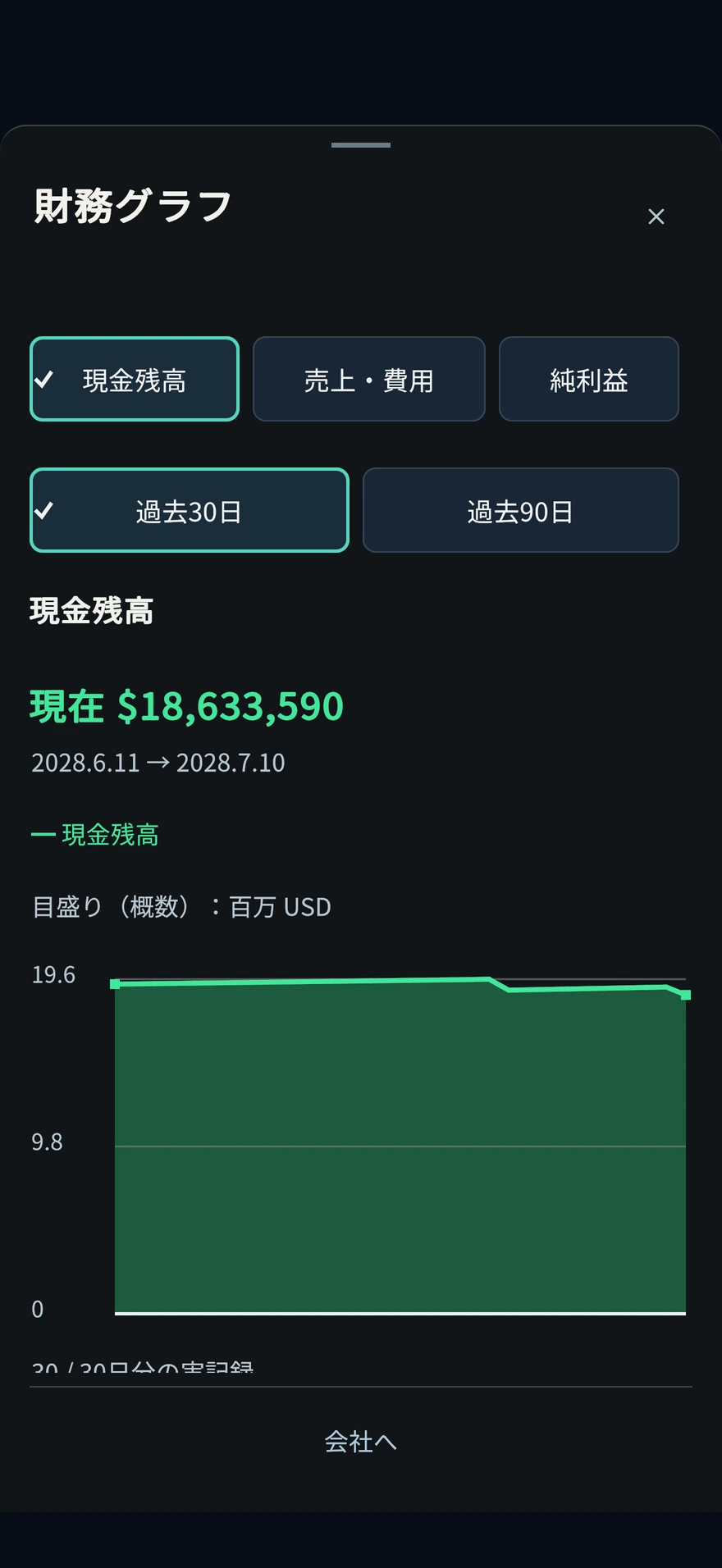
How do you read MRR, weekly income and expenditure, and monthly financial statements?
MRR is an indicator of monthly recurring sales. Weekly reports are a record of the actual management period, and monthly financial statements are the gateway to checking sales, expenses, and profits for a calendar month.
How do you read MRR, weekly income and expenditure, and monthly financial statements?
MRR is an indicator of monthly recurring sales. Weekly reports are a record of the actual management period, and monthly financial statements are the gateway to checking sales, expenses, and profits for a calendar month.
Locations that open in-game
- company
- finance
MRR is an indicator of monthly recurring sales. Weekly reports are a record of the actual management period, and monthly financial statements are the gateway to checking sales, expenses, and profits for a calendar month.
Separate the estimated monthly amount from the actual income and expenditure for the period.
MRR is an indicator that measures current recurring sales on a monthly basis. Actual sales are a record of the period in which products were actually provided, and are separate from profits after deducting expenses, interest, and depreciation. Before comparing, make sure to match the type and time period of the numbers.
For example:Even if MRR is $300,000, this week's sales are not necessarily $300,000.
Even if the monthly estimate is $300,000, it does not mean the same as 7 days' worth of actual sales or the deposit on that day. Customers and supplies may change. Check the actual sales, expenses, and profits for the period using the weekly results for the week and the monthly financial results for the month.
Operating procedure
- Check MRR, contract customers, and current supply on the model screen.
- Check the breakdown of expenses such as salary, rent, cloud, electricity, research, and learning in the weekly report.
- Check net income, depreciation, interest, etc. on the monthly financial statements.
- Review your accrued and unpaid expenses and the first payment date of the next month.
be careful
MRR should not be interpreted as cash deposited on that day or as a fixed profit.
Differences from the previous period will be displayed when comparable actual records are available.
How can I check future payments and lack of funds?
With the 30-day and 90-day payment calendars, you can check your monthly payments and financial outlook. Switch and compare the case where no deposit is expected and the case where the current monthly sales estimate is maintained.
How can I check future payments and lack of funds?
With the 30-day and 90-day payment calendars, you can check your monthly payments and financial outlook. Switch and compare the case where no deposit is expected and the case where the current monthly sales estimate is maintained.
Locations that open in-game
- company
- 30-day and 90-day payment calendars
With the 30-day and 90-day payment calendars, you can check your monthly payments and financial outlook. Switch and compare the case where no deposit is expected and the case where the current monthly sales estimate is maintained.
Change the assumptions of your forecast and consider the expenses you can tolerate.
The outlook will change between a forecast that does not anticipate deposits and a forecast that maintains the current sales target. First, check the assumptions and include today's expenditure for additional investment and subsequent ongoing expenses. Payment will not be made just by displaying the schedule.
For example:Comparing adoption and GPU purchase
For recruitment, in addition to the initial recruitment fee, enter the subsequent salary. When purchasing a GPU, consider the purchase cost and necessary ongoing expenses. Since the forecast is not automatically guaranteed even if sales change, it is checked against the cash after execution.
Operating procedure
- Open the payment calendar from the company management/planning screen.
- Check the unpaid expenses and borrowed principal to be paid at the beginning of the month, and the assumptions for the forecast.
- If you are considering hiring or investing, enter ``today's additional expenses'' and ``future additional expenses'' and compare.
- Look at the days when you're about to run out and the big payouts.
- Compare spending, supply, and procurement proposals and check the latest terms before execution.
Confirmation after operation
- Check whether the forecast's deposit assumptions and additional expenditures match the plan you're considering.
be careful
If you are proceeding with final research or implementation into society, check the displayed budget for continuing operations and the dates that will be excluded from the forecast due to evaluation and capacity. It is not a forecast that automatically includes all practical expenses that change depending on conditions, new investments, and changes in sales. Match your forecast to your actual cash.
It only opens the schedule, but does not perform payments or contract renewals.
What is the difference between borrowing and investing?
Borrowing increases cash and debt, and requires interest and repayments. Investment increases cash, but new shares change the founder's equity. Neither is sales.
What is the difference between borrowing and investing?
Borrowing increases cash and debt, and requires interest and repayments. Investment increases cash, but new shares change the founder's equity. Neither is sales.
Locations that open in-game
- company
- finance
Borrowing increases cash and debt, and requires interest and repayments. Investment increases cash, but new shares change the founder's equity. Neither is sales.
Choose by including the burden after procurement.
Borrowing involves payments of principal and interest, while investment involves changes in equity due to new shares. Cash increased through procurement is not business sales. It will be easier to make decisions if you consider what it will be used for and how to support ongoing costs.
Before you start
- Determine the amount of the shortfall and any expenses that continue after procurement.
| method | burden to confirm |
|---|---|
| Borrowing | Interest, repayment period, and principal repayment. Cash and debt increase. |
| investment | New shares and founder's equity. Cash and shareholder composition will change. |
For example:Procurement for capital investment
In the loan proposal, check whether you will be able to pay your salary and rent even after the monthly repayments. In the investment proposal, we will confirm the founder's equity after procurement. In both cases, the arrival of equipment or increase in sales does not occur immediately, so we look at the funds until operation on the payment calendar.
Operating procedure
- Compare the amount raised and the cash after raising on the finance/funding conditions screen.
- If you are borrowing money, check the interest rate, repayment period, principal and interest, and monthly payment.
- If it is an investment, we will check the evaluation before procurement, the ratio of new shares, and the founder's equity after procurement.
- After looking at the operating costs and investment plan after procurement, perform the confirmation operation.
Confirmation after operation
- Check actual deposits and changes in debt or ownership structure.
be careful
Funding alone does not necessarily improve the profitability of research or API businesses.
Stock options: What is the difference between granting, vesting, and exercising?
Grant is a record of the right to purchase future shares, vesting is the right to meet certain conditions, and exercise is the employee's payment and actual issuance of shares. Funds enter the company when the exercise is executed.
Stock options: What is the difference between granting, vesting, and exercising?
Grant is a record of the right to purchase future shares, vesting is the right to meet certain conditions, and exercise is the employee's payment and actual issuance of shares. Funds enter the company when the exercise is executed.
Locations that open in-game
- company
- finance
- capital market
- employee stock
Grant is a record of the right to purchase future shares, vesting is the right to meet certain conditions, and exercise is the employee's payment and actual issuance of shares. Funds enter the company when the exercise is executed.
From recording rights to payment and stock issuance
Separate vesting, vesting, and exercise to check when cash and actual shares change.

Left: Read fixed conditions and grant rights
Read the administrative fees, the exercise price to be fixed, the fixing date and deadline. The grant will increase the number of potential shares, but the actual issuance of new shares and payment by employees has not yet taken place.
Center: Check confirmed and unexercised minutes
The confirmed amount also includes the exercised amount. Check expiration and deadlines, as well as post-retirement conditions. The company will not receive the money just by confirming the payment.
Right: Fulfill the conditions and clearly exercise
Check the conditions of listing, stock price, rights and deadline, and read the number of shares and payment. The company's cash and shareholder composition will change by "Execute payment and stock issue".
The payment to the company is the number of shares to be exercised x the exercise price fixed at the time of grant. There will be no automatic exercise. This is separate from product sales and deposits to the founder personally.
Files and materials are metaphors for the status of rights and do not represent the actual number of shares, granted quota, or stock price. It does not indicate the handing over of cash between persons or the receipt of compensation on the date of grant.
Before you start
- Review named professionals, remaining grants, and plan administrative costs.
- Check the exercise price to be fixed, vesting start date/all shares vesting date, exercise deadline and post-retirement deadline.
You can read the table by moving it left and right.
| step | company cash | Stocks/Equity |
|---|---|---|
| Grant | Pay the administrative costs of the system. There are no employee payments. | The actual number of issued shares does not increase. This will be reflected in the potential shares and the expected equity after all exercise. |
| Vesting | Payment will not be made just by confirmation. | The range of rights that can be exercised increases. It's not a new stock yet. |
| Exercise of rights | The company receives the number of shares to exercise x the fixed exercise price. | New shares will be issued, and the number of shares held by employees and the current founder's equity will change. |
For example:How to read “Granted 1,000 / Confirmed 400 / Exercised 100”
Assuming no expiration, the 400 confirmed will include 100 exercised. The unexercised commitment is 300, so don't add the three numbers. If you exercise 100 shares, meeting all other exercise conditions, and the fixed exercise price is $20, the company's deposit will be $2,000. The payment amount is not calculated based on the current stock price. If the number of vested shares remains unchanged, the remaining exercisable shares are 200. The numbers are a temporary example for explanation purposes; in reality, you will also check expiration, expiry date, and stock price conditions.
Operating procedure
- Select the target employee and the number of shares to be granted, and compare the plan's administrative costs, fixed exercise price, and schedule.
- Read the impact on founder equity after all options are exercised and select "Grant rights." Administrative expenses will be paid, but there will be no employee payments or new stock issues at this point.
- Advance the date and check "Granted/Fixed/Exercised". Before the confirmation starts, it is fixed at 0, and after that it is fixed according to the period of enrollment. Once you retire, the confirmation process will stop.
- Exercise requires that the stock be listed, be within the time limit, have unexercised vested rights, and that the current stock price exceeds the fixed exercise price.
- Once the conditions are met, select the number of shares under "Confirm employee exercise" and read the payment from employees, company cash after exercise, and founder's equity.
- Select "Perform payment and issue of shares" and check the number of exercised shares and actual shareholder composition. Automatic exercise will not occur just because the conditions are met.
Confirmation after operation
- Distinguish between granted, confirmed, exercised, and expired, and check the number that can currently be exercised.
- Check the company's cash, issued shares, number of employee shares and founder's equity after exercise.
be careful
Rights may lapse due to expiration or retirement conditions. Even if a right is vested, it does not mean that it can be exercised forever.
Payments from employees are a source of funding for the company. It does not count as product sales or deposits to the founder personally.
Check founder equity before and after investment or IPO
Separate your current shareholder structure and potential shares, including unexercised rights. The ratio changes depending on investment, IPO, and exercise of rights.
Check founder equity before and after investment or IPO
Separate your current shareholder structure and potential shares, including unexercised rights. The ratio changes depending on investment, IPO, and exercise of rights.
Locations that open in-game
- company
- finance
- capital market
- View shareholder composition and potential shares
Separate your current shareholder structure and potential shares, including unexercised rights. The ratio changes depending on investment, IPO, and exercise of rights.
Even if the number of shares held remains the same, the ratio will decrease as the total number increases.
Equity is the ratio of the number of shares you own divided by the total number of outstanding shares. Unexercised options are viewed separately from currently outstanding shares. The outlook before and after issuing new shares and including potential shares are compared under the same conditions.
For example:If you own 100 shares and issue 25 new shares,
If the founder owns all 100 existing shares, the new total is 125 shares, and the founder's equity is 100 ÷ 125 = 80%. Even if the number of shares does not decrease, the ratio will change. The actual number of new shares and the forecast including options will be read on the confirmation screen.
Operating procedure
- View the current outstanding shares and the equity of the founders and other shareholders.
- Check the potential shares of stock options and their prospects after exercise.
- On the investment or IPO confirmation screen, compare the new shares to be issued and the ratio after execution.
- After execution, reconfirm the actual shareholder composition and deposit.
Confirmation after operation
- Compare the predicted ratio and the current value after execution under the same conditions.
Judgment, planning, comparison6
Check the conditions before executing and review them later.
In what order should I watch “Today’s Judgment”?
You can check deadlines and suspension responses, company goals and guidance, and any projects separately. Priority will be given to response deadlines, accidents, and lack of funds and supplies.
In what order should I watch “Today’s Judgment”?
You can check deadlines and suspension responses, company goals and guidance, and any projects separately. Priority will be given to response deadlines, accidents, and lack of funds and supplies.
Locations that open in-game
- company
- Management/Planning
You can check deadlines and suspension responses, company goals and guidance, and any projects separately. Priority will be given to response deadlines, accidents, and lack of funds and supplies.
Differentiate between decisions that can wait and decisions that need to be made before moving forward with the week.
Read response deadlines and suspended issues first, then check the guidance, goals, and optional projects. The specification you will check later is organizing the list. This is not an operation that extends deadlines or skips outstanding mandatory decisions.
For example:Optional items and required responses are lined up
First confirm the reason and deadline for the required response, and then make the necessary decisions. Any project will be considered based on cost and available capacity of the person in charge. If you plan to apply for a job that you have set to ``Check Later'', please re-check the original application deadline.
Operating procedure
- Open "Check today's decisions, resources, and facilities" on the company screen.
- Check the required deadlines and suspension measures.
- Find out what's next for your guide and your company's goals.
- If necessary, set any item to ``Review Later'' and reconfirm it before the deadline.
be careful
The confirm later operation does not extend the job application deadline or contract terms.
What can we learn from the personnel/GPU usage schedule?
You can check the personnel and computational resources shared by research, learning, social practice, implementation support, etc. on a 7-day and 30-day schedule. This is the forecast if current conditions are maintained.
What can we learn from the personnel/GPU usage schedule?
You can check the personnel and computational resources shared by research, learning, social practice, implementation support, etc. on a 7-day and 30-day schedule. This is the forecast if current conditions are maintained.
Locations that open in-game
- company
- Management/Planning
You can check the personnel and computational resources shared by research, learning, social practice, implementation support, etc. on a 7-day and 30-day schedule. This is the forecast if current conditions are maintained.
Schedule is a screen that searches for overlapping tasks that use the same resources.
Even if you look at each job individually and meet the requirements, if you proceed with them simultaneously, you may run out of personnel and computational resources. In addition to current conditions, look at the timing of cloud termination, delivery, and facility completion to find the period during which shortages will occur.
For example:GPU arrives later than cloud termination
Look for any periods between the end date and the expected delivery date where supply cannot be supported. Compare additional procurements, allocations, and job adjustments on the original screen. Even if a delivery is scheduled, we will not add that GPU to today's supply.
Operating procedure
- Open the usage schedule from "Usage of personnel/GPU".
- Check the number of people secured for each job category and the amount remaining in practice.
- See markers for cloud end of supply, announced supply reductions, GPU deliveries and facility completion.
- Review recruitment, allocation, and payment capacity on the original screen of the missing work.
be careful
We do not add undelivered GPUs or unfinished DCs to your current available supply. It is not a screen that predicts future employment or new accidents.
How can I compare several draft changes?
You can compare Plan A and Plan B by combining recruitment, spot cloud, allocation, GPU ordering, research theme, and learning start. Editing the draft and actually paying are two different things.
How can I compare several draft changes?
You can compare Plan A and Plan B by combining recruitment, spot cloud, allocation, GPU ordering, research theme, and learning start. Editing the draft and actually paying are two different things.
Locations that open in-game
- company
- Management/Planning
You can compare Plan A and Plan B by combining recruitment, spot cloud, allocation, GPU ordering, research theme, and learning start. Editing the draft and actually paying are two different things.
The comparison is a draft. Payment will occur after confirmation
For multiple changes, the conditions change depending on the order of operations. Compare the overall expenses, daily costs, and resources, such as starting learning after hiring. Saved drafts will not be reflected in management, so please reconfirm the latest conditions before execution.
For example:Plan A is allocation change, Plan B is additional procurement
In plan A, we will see if other tasks will be reduced by the increased allocation. Plan B looks at today's expenses and ongoing costs. Editing the draft will not change the cost or date. Check the payment terms of your chosen plan and check the resources and cash available after execution.
Operating procedure
- Open Compare multiple draft changes.
- Add and edit up to 8 operations for each proposal and check the order in which they will be executed.
- Compare cash expenditures, daily expenses, shared resources, and work impact.
- Save your draft or click "Check payment terms for selected proposal" to proceed with execution.
Confirmation after operation
- Check whether the expenditures and resources of the implemented proposal meet the latest confirmation conditions.
be careful
Viewing or editing does not involve hiring, purchasing, or progressing the number of days.
If an intermediate operation is unsatisfactory at the time of execution, only intermediate recruitment and expenditure will remain. Double check all terms.
Can it be automatically stopped a little before the deadline?
With the "setting to stop before the deadline", you can prepare for deadlines such as cloud termination, evaluation expiration, and deadlines for answers and practical work.
Can it be automatically stopped a little before the deadline?
With the "setting to stop before the deadline", you can prepare for deadlines such as cloud termination, evaluation expiration, and deadlines for answers and practical work.
Locations that open in-game
- company
- Management/Planning
With the "setting to stop before the deadline", you can prepare for deadlines such as cloud termination, evaluation expiration, and deadlines for answers and practical work.
The suspension date is not the deadline itself, but a date for confirmation.
Settings that stop before the deadline gives you time to think about updates and responses. Simply reading the stopped notification does not complete the contract renewal or response. Check the stop date and original deadline separately and run on the target original screen.
For example:If the deadline is the 10th, set it to stop 3 days before.
The confirmation date is the 7th and the original deadline is the 10th. Even if you stop and confirm on the 7th, the deadline will not be extended. Make the necessary payments, updates, and answers separately and check the actual status of the target. Dates are illustrative examples.
Operating procedure
- Select no suspension, 1 day before, 3 days before, or 7 days before for each target.
- Check the proposed stop date and the original deadline.
- Save your settings. Even if you "Advance one week forward", it will stop midway if the confirmation date before the deadline arrives.
- If it stops, make the necessary decisions on the original contract renewal/re-evaluation/response screen.
Confirmation after operation
- Check the set suspension date and the original contract/response deadline separately.
be careful
Just marking it as confirmed will not cause you to pay, update, respond, or change the deadline.
Unoccurred incidents and uncertain delivery dates are not treated as a confirmed suspension schedule.
How to look back on work that was behind schedule?
Compare the recorded expected completion with the actual progress/stoppage/completion in weekly plans and results. Please read this including any changes to the conditions that occurred later.
How to look back on work that was behind schedule?
Compare the recorded expected completion with the actual progress/stoppage/completion in weekly plans and results. Please read this including any changes to the conditions that occurred later.
Locations that open in-game
- company
- Management/Planning
Compare the recorded expected completion with the actual progress/stoppage/completion in weekly plans and results. Please read this including any changes to the conditions that occurred later.
The difference from the schedule can be read from the date and conditions of the stop.
The predicted completion date may differ from the actual progress date. Rather than just comparing the total number of days, it will be easier to revise the next plan if you check the days when progress did not increase and the changes in personnel, supply, and budget.
For example:If you are 3 days behind schedule
If there is a delay of 3 days, read the actual results to see how many days it was delayed and which conditions were lacking. If there are supply outages or the need to secure personnel, we will consider a plan to support you during that period in the next plan. 3 days in this example is not a fixed delay condition.
Operating procedure
- Open weekly reports and records of plans and results.
- Compare your initial recorded expectations to the actual date of progress.
- Check the missing conditions for days when progress did not increase.
- We will return to the cause of the outage and the original work, and review the next allocation and costs.
be careful
This is not a record of shared salaries and computing resource costs that are fictitiously divided into actual costs for each job. It also does not add plans or daily results that have not been observed in the past.
Fix frequently checked facilities, models, and contracts
You can pin up to 3 items on the company screen using ``Targets of Interest''. This is an operation that makes it easier to progress and return to the next decision.
Fix frequently checked facilities, models, and contracts
You can pin up to 3 items on the company screen using ``Targets of Interest''. This is an operation that makes it easier to progress and return to the next decision.
Locations that open in-game
- company
- What to focus on
You can pin up to 3 items on the company screen using ``Targets of Interest''. This is an operation that makes it easier to progress and return to the next decision.
Fixation is a shortcut to what you often check
It will be easier to return from the company screen by selecting an ongoing facility, model, or contract with an upcoming expiry date. The fixed priority is determined based on whether confirmation is required at that time. Even if you unpin it, it will not terminate the target itself.
For example:Use 3 frames differently
You can fix the model you are currently learning, the facilities waiting for delivery or construction, and the contracts you are considering renewing. Once you have made your decision, switch to the next target you want to see. Fixation alone does not change the progress or deadline.
Operating procedure
- Select the facility, model, or contract you want to check.
- Check the current status of the pinned target, as well as deadlines and next operations.
- When replacing the frame, remove unnecessary fixations and select another target.
Confirmation after operation
- Check whether you can open the original screen of the pinned target from the company screen.
be careful
Performance, progress, and sales will not increase just by fixing it. This is the entry point to check the actual conditions of the target.
Society/Safety/Model Evaluation5
Judging answers, practices, evaluation, and authority separately.
Does external evaluation improve performance?
External evaluation is an operation in which model evaluation materials are obtained through paid practice. This is not an operation that increases performance or safety itself. Read not only whether or not you passed, but also the evaluation range, conditions, and expiration date.
Does external evaluation improve performance?
External evaluation is an operation in which model evaluation materials are obtained through paid practice. This is not an operation that increases performance or safety itself. Read not only whether or not you passed, but also the evaluation range, conditions, and expiration date.
Locations that open in-game
- menu
- Society and safety
External evaluation is an operation in which model evaluation materials are obtained through paid practice. This is not an operation that increases performance or safety itself. Read not only whether or not you passed, but also the evaluation range, conditions, and expiration date.
Read the passed target, scope, and deadline as a set.
Evaluation is a study of the model, not learning to improve the model. Even if a pass is displayed, check that it corresponds to the target and scope necessary for the current judgment and that it is still within the expiration date. This should not be confused with an increase in performance value.
For example:Unable to reinstate permissions even though they have been evaluated
Read which model was evaluated, the scope, result, and expiry. On the resumption screen, also check unmet conditions such as unresolved incidents or committee requirements. Evidence for another model or an expired pass does not establish that the current resumption conditions are met.
Operating procedure
- Check the cost, required practices, and scope on the evaluation/supervision screen of the target model.
- Initiate evaluation and secure personnel, resources, and daily payments.
- Review completed materials for target models, evaluation dates, scope, remaining uncertainties, and deadlines.
- If necessary for publication, authority, or committee conditions, we will use currently available materials to make decisions.
Confirmation after operation
- Check whether the target model, evaluation scope, pass/fail, and deadline correspond to the required judgment.
be careful
Due to expiration or changes in model conditions, the material may no longer be valid for use as a current evaluation. Models without evaluation materials will not be treated as passed.
What to check for execution authority and information accidents?
Publishing the model and expanding execution privileges are separate decisions. In the event of an accident, we will ensure that the affected model is shut down, investigated, reevaluated, and reactivated.
What to check for execution authority and information accidents?
Publishing the model and expanding execution privileges are separate decisions. In the event of an accident, we will ensure that the affected model is shut down, investigated, reevaluated, and reactivated.
Locations that open in-game
- menu
- Society and safety
Publishing the model and expanding execution privileges are separate decisions. In the event of an accident, we will ensure that the affected model is shut down, investigated, reevaluated, and reactivated.
Confirm disclosure, investigation completion, and authority resumption separately
Even if the model has been published, execution privileges may be suspended. After reading the results of accident response and re-evaluation and meeting the conditions necessary for restarting, restart operations are performed. Narrow down the scope and check what permissions are suspended.
For example:After completing the paid survey
Read the findings and remaining issues to see which ratings are currently in effect and which approvals are required. Even after the conditions are met, you will still need to resume permissions. Just because the investigation is complete does not mean that all the privileges being provided have been restored.
Operating procedure
- Review the accident target model, authority, impact and costs.
- Select the displayed response, such as stopping execution of external input or paid survey.
- View investigation results, unresolved incidents, and currently valid passing grades.
- If you decide to resume, review the terms and costs of reinstatement and do so explicitly.
be careful
Suspended privileges will not be automatically reinstated just after the investigation is completed. Even preventive measures and evaluations do not necessarily eliminate risk.
What changes when you start a board of directors/safety committee?
If the system is started on a voluntary basis, approval will be required for the new release of eligible high-performance models, expansion of execution authority, and restarting after an accident. The system continues with the company.
What changes when you start a board of directors/safety committee?
If the system is started on a voluntary basis, approval will be required for the new release of eligible high-performance models, expansion of execution authority, and restarting after an accident. The system continues with the company.
Locations that open in-game
- menu
- Society and safety
If the system is started on a voluntary basis, approval will be required for the new release of eligible high-performance models, expansion of execution authority, and restarting after an accident. The system continues with the company.
Approval is one of the conditions for execution
In the system's target model, approval is added to disclosure and authority decisions. Even if you get approval, publish/resume on the original screen. If the deadline for materials or accidents change, check to see if the approval is valid under the current conditions.
For example:Once the public proposal is approved
Return to the target model's publish screen and read the cost and missing conditions. Check separately that it has been approved and that it has been published. After the release, we will also look at the product delivery model and supply to see if it has led to actual provision.
Operating procedure
- Check the conditions for starting the system and the eligible models.
- Read the evaluation materials, safety, unresolved accidents, pros and cons, and reasons for suspension for each proposal.
- We will arrange and deliberate on missing materials, funds, and response conditions.
- After approval, execution is determined on the original publication and permissions screen.
be careful
Approval alone does not result in publication or payment. Re-deliberation is required due to evaluation deadlines, performance changes, new accidents, etc.
Offers that have already begun or practices that have already been paid will be treated as retaining their original terms.
Prepare for advance notice of supply decline and restore after occurrence
Once you receive advance notice, you can choose to invest in preparation or in recovery after the event occurs. Separate payment from actual work completed.
Prepare for advance notice of supply decline and restore after occurrence
Once you receive advance notice, you can choose to invest in preparation or in recovery after the event occurs. Separate payment from actual work completed.
Locations that open in-game
- company
- finance
- Business/growth
- strategy
- Crisis preparedness
Once you receive advance notice, you can choose to invest in preparation or in recovery after the event occurs. Separate payment from actual work completed.
Consider start-up costs, practical completion, and maintenance separately.
Preparations are not completed at the moment of purchase, but must be completed by securing the necessary personnel, practices, and budget. Even after completion, we will check the maintenance conditions during supply declines. We also compare the recovery time after the outbreak and the natural recovery time if nothing is done.
Before you start
- Check the period of decline, start deadline, required working days and responsible engineer.
For example:I want to start preparing just before the deadline.
We look at not only whether you can pay the start-up fee but also whether you can complete the necessary work by the deadline. If people are reserved for other jobs, check how many people are actually available. After payment, check the progress, and after completion, check the next day's supply status.
Operating procedure
- Compare backup routes and replication conditions in "Choose a preparation method and cost."
- Read the start-up costs and daily costs for operations and maintenance, and decide whether to start preparations or postpone them.
- Check practical progress up to the deadline and maintenance budget during reduced supply.
- If you choose post-occurrence recovery, check the additional start-up costs and required practices.
- Check the supply status the next day after completing work and the natural recovery date.
Confirmation after operation
- Check whether the number of working days and the actual supply multiplier match the response status.
be careful
Lack of personnel and payment capacity halts preparation and maintenance effectiveness. Just paying the start-up fee doesn't mean the work is done.
Acquisition/Listing/Re-challenge5
Conditions for growth and the next stage for the company.
What is the difference between stock ownership, acquisition, and business integration?
Owning equity, paying for an acquisition, and handing over people, customers, and models are different stages. Review costs during integration and acceptance terms upon completion.
What is the difference between stock ownership, acquisition, and business integration?
Owning equity, paying for an acquisition, and handing over people, customers, and models are different stages. Review costs during integration and acceptance terms upon completion.
Locations that open in-game
- menu
- Capital/management
- Acquisition of AI business
Owning equity, paying for an acquisition, and handing over people, customers, and models are different stages. Review costs during integration and acceptance terms upon completion.
Stock ownership, acquisition completion, and handover after integration
The personnel, customers, and model of the business may not always be available on the day you hold the stock or pay the consideration.

Left: Separating stocks held and businesses to be acquired
Just owning stock will not inherit personnel, customers, or models. For M&A from stocks, confirm the required equity, remaining consideration, integration start-up costs, working capital and seats.
Central: Pay the price and meet the conditions for integration
Even if an acquisition is completed, the business will only be transferred once the integration is completed. If there are not enough seats available even after the scheduled date, you will have to wait, and during that time you will continue to pay the salaries and integration costs of the handover team.
Right: Transfer only once and decide whether to provide
Personnel, customers, and models will be taken over when the integration is complete. The acquisition model has not yet been released. Check the impact of publishing, product allocation and capacity, and verify sales from actual offerings.
There is a difference between 100% progress and completion of transfer. Check the status of the integration and what was actually transferred. The other party's cash deposits, loans, and past sales will not be inherited.
Persons, forms, and files are metaphors to explain the situation, and do not represent the number of shares held, number of successors, or number of customers. File colors distinguish stages and do not indicate superior or inferior performance. The picture of handing over materials is not an explanation of the in-game handing operation or adding free copies of businesses and models.
Before you start
- Check the vacant research seats and office seats that can accept the number of people taking over, and the status of hiring freeze. Any business integrations in progress must be completed first.
- If the CEO personally owns stock in the target company, he or she will need to sell that personal stock before proceeding with the acquisition of the business in the company's name. Check individual stocks and company acquisition funds separately.
- In addition to the acquisition consideration and integration start-up costs, we look at the salaries of the handover team and daily integration costs that will be incurred during the integration. You must have the ability to pay, including unpaid expenses.
- In "M&A from stock," we also check the required equity, cash consideration for the remaining stock, integration start-up costs, and post-acquisition working capital. The terms and conditions are different from acquisitions through asset transactions.
You can read the table by moving it left and right.
| step | Handover status | things to check |
|---|---|---|
| own stock | Business personnel, customers, and models will not be transferred. | M&A equity, consideration, seats, and working capital will be confirmed separately. |
| Acquisition completed/integration underway | Pay the price and wait for the transfer until the integration is complete | Payroll and daily integration costs will be incurred |
| Integration period has passed/Waiting list | Even if the progress is 100%, if there are not enough seats, wait for the transfer. | Secure vacant research and office seats. Salaries and integration costs continue while you wait. |
| Business integration completed | Transfer people, customers, and acquisition models once and for all | The model has not been released. Check the impact of disclosure and product allocation/supply |
For example:Even after the scheduled date, if there are not enough seats, wait.
This is a temporary transaction that requires 4 vacant research seats and 3 vacant office seats. If there are only 3 research seats and 3 office seats available at the end of the integration period, the transfer will be on hold. Secure research seats for at least 4 people and check the integration results the next day. Payroll and integration costs continue while you wait. The number of participants is for illustrative purposes only, and the actual number of seats and period required will be confirmed in the terms of the acquisition.
Operating procedure
- From "AI Business Acquisition", open "View Acquisition Terms" for the target. If proceeding from the stock market, open the M&A conditions of the target company.
- Confirm the acquisition target, the current payment amount, the number of people and seats to be transferred, the integration period, and the integration fee and salary. In the stock route, you can also read ``Acquisition evaluation and breakdown of stock holdings'' and ``Business to be inherited and operational burden.''
- Once the conditions are met, you can pay by ``acquiring the AI business'' or ``acquiring the remaining shares'' using the stock route. At this point, the transfer of personnel, customers, and acquisition models has not yet been completed.
- Check the progress and "Integration Status" in "View Integration and Acquisition Model". Even if the scheduled date arrives, if there are not enough research seats or office seats, the message will be "Waiting for seats to welcome staff".
- We will resolve the seat shortage and confirm the integration completion record in the next daily update. Handover can only be done once. The customer confirms the handover limit and the actual number based on the market availability at the time of completion.
- The acquisition model is unpublished at the time of completion of the integration. If you use it, check the impact of "Publish acquisition model" and review the provision model, price, and capacity in "Determine product allocation" after publishing. Check actual post-offer sales.
Confirmation after operation
- Review the integration completion date, personnel transferred, actual customers transferred, acquisition model and publication status. 100% progress and transfer completion are not necessarily the same.
- The equity route distinguishes between the current cash payment and the cost of the shares held that were transferred to the acquired assets. Do not double count your original holdings as tradeable shares.
be careful
The acquisition target is the technology, human resources, and customers of the AI business presented in the game. The other party's cash deposits, loans, past sales, and existing contract obligations will not be inherited.
In M&A from stocks, the stocks held are not sold, but the acquisition cost is transferred to the acquired assets. It is not an operation to make a profit on sale or to keep both the owned stocks and the acquired assets. Simply having the required equity does not free the remaining consideration or integration costs.
Even after the integration is complete, the salaries of transferred personnel and the costs necessary for actual provision will continue. Acquisition models are recorded separately from in-house learning as technologies inherited through paid acquisitions.
Publish Acquisition Model changes your company's standard delivery model. This will also affect delivery destinations that do not have product-specific allocations, so check the allocation and supply of existing products before making your selection. Just by publishing or handing over, the other party's past sales will not be added to your company.
Will I be listed and receive funds once IPO preparation reaches 100%?
The end of the preparation period, the fulfillment of the company's conditions and the operation of going public are separate. The deposit is paid at the time of signing the contract, and the funds from the new shares go into the company at the time of public offering.
Will I be listed and receive funds once IPO preparation reaches 100%?
The end of the preparation period, the fulfillment of the company's conditions and the operation of going public are separate. The deposit is paid at the time of signing the contract, and the funds from the new shares go into the company at the time of public offering.
Locations that open in-game
- menu
- Capital/management
- Preparation for listing/capital market
- Investment banking/IPO
The end of the preparation period, the fulfillment of the company's conditions and the operation of going public are separate. The deposit is paid at the time of signing the contract, and the funds from the new shares go into the company at the time of public offering.
IPO: Preparation contract, confirmation of conditions, stock offering
100% preparation progress and listing are different. Re-read the terms and conditions and confirm the company funds after choosing to go public.

Left: Compare conditions, pay deposit and prepare
Compare the bank’s preparation period, upfront payment, underwriting fee, and offering size. Signing pays the upfront fee and records the offering size; it does not list the company or bring in the proceeds yet.
Center: Compare preparation period and company conditions
Even if the progress is 100%, it cannot be published if the company's conditions are not met. Check the displayed business conditions, financial results, and preparations of the contracted bank. Even if you achieve all of that, publishing operations are another matter.
Right: Select Publish and check the actual record
Reread the company's valuation, expenses, and equity at the time of public offering, and select "Publish stock." Funds minus underwriting fees enter the company, and the issued shares and shareholder composition change.
The IPO funds belong to the company. It is not product sales or the founder's sales income. Read the paid deposit and the underwriting fee at the time of publication separately.
People, forms, and files are metaphors that describe stages, and do not represent the number of banks, stocks, or required personnel. File colors differentiate candidates and status and do not indicate bank ranking or recommendation. The closed PC and open PC are metaphors for work before and after publishing, and are not explanations of actual operations or adding automatic publishing. The right does not guarantee business profits or investment success.
Company receipts at the time of public offering and procurement after deducting all costs
The company's receipt at the time of going public is the amount raised in new shares minus underwriting fees. Procurement after deducting all costs is the total amount of the transaction including the deposit at the time of contract. We do not double deduct the deposit you have paid and the funds you will receive.
There is a difference between a 20% public offering and a 20% stake for new shareholders.
The offering size is the ratio of new shares to existing shares. In the hypothetical example of issuing 20 new shares for 100 existing shares, even if the offering size is 20%, the total number of shares after the offering will be 120. The new shareholder's equity is 20 ÷ 120 ≈ 16.7%. The founder's equity is also calculated by dividing the pre-publication ratio by 1.2. The number of shares is for illustrative purposes only, and the actual value can be confirmed in ``View the shareholder composition after public offering''.
Read the missing conditions in the conditions section of the business you are running.
For normal business, we look at the number of customers, the cumulative surplus of the business excluding gains on stock sales, and the number of monthly closings. If the conditions for the AI operation business are displayed, check the actual number of operating days, book net assets, realized operating surplus after deducting all expenses, the cumulative surplus of the company as a whole, and the monthly financial results after opening. Not all shortfalls can be resolved simply by unrealized gains on stocks or advancing the number of days.
Before you start
- Check the upfront fee and the company's operating expenses that will continue during preparation. Do not use projected amounts that have not yet been raised as your current payment capacity.
- Read the missing items in "Conditions for Listing." Since the conditions displayed for normal business and AI operation business are different, we will use the actual conditions column as the standard.
- If you have a contract with a bank, open the disclosure terms and conditions of that bank. Changing to a different bank or reselecting the exposure size requires cancellation of the existing provision and a new contract.
You can read the table by moving it left and right.
| step | Listing and deposit | Cost/things to check |
|---|---|---|
| contract preparation | Not listed or deposited yet | Pay the deposit and record the preparation period and scale of publication. |
| Preparation period is over | If the company's conditions are not met, it cannot be published. | 100% progress is different from achieving all listing conditions. |
| Achieve all conditions | I haven't done any publishing operations yet. | Reconfirm the current company evaluation, fees, and equity |
| Execute “public offering” | New stock funds enter the company | Deduct the underwriting fee at the time of public offering and update the shareholder composition |
For example:The deposit at the time of publication was $950,000, and the net amount for the entire transaction was $850,000.
This is a hypothetical transaction with $1 million raised in new shares, $100,000 in paid deposits, and $50,000 in underwriting fees at the time of public offering. The company receives 100 − 5 = $950,000 at the time of going public. Procurement less all costs is 100 − 10 − 5 = $850,000. If the company's cash immediately before going public is $1.4 million, after going public it will be $140 + 95 = $2.35 million. The deposit is already reflected in the last minute cash. This example shows how to read a display that excludes intervening operating expenses and other transactions, and the actual costs, valuations, and cash can be confirmed by its disclosure terms and company records.
Operating procedure
- Compare each bank's preparation period, deposit, underwriting fee, and public offering size in "Investment Banking/IPO." Investment banks can also open conditions for ``listing preparation'' or ``progress in listing preparation.''
- Check the company's receipts at the time of public offering, all expenses, and equity after public offering under "Preparation period and public offering conditions," "Breakdown of procurement amount and new shares," and "View shareholder structure after public offering."
- Pay the deposit when you sign a contract and start preparations for listing. The bank's preparation period, commission rate, and disclosure scale are recorded in the contract. At this point, we have not listed or received any funding.
- While preparing, you can check the remaining days and missing conditions from "Check release conditions". Even if the preparation progress is 100%, if the necessary company conditions have not been met, the message will remain "Please meet the listing conditions." Check the next closing date for monthly closing.
- Once all the conditions are met, re-read the procurement forecast that was recalculated based on the company's valuation at the time of public offering, and select "Publish stock." Merely reading the notification that conditions have been met will not execute publication or deposit.
- Check listing records, company receipts at time of going public, current cash, outstanding shares and shareholder structure. After that, check the performance after listing and how the funds will be used in "Quarterly Report/Dividend/Research Investment".
Confirmation after operation
- Check to see if the company has been listed and the issue of new shares, underwriting fees, and deposits into the company have been recorded. The projected procurement amount may not be the same as the runtime amount.
- The paid deposit will not be deducted again from the deposit at the time of publication. However, the cost of the entire transaction includes both the deposit and the underwriting fee.
- Deposits are financing for the company. It is read separately from product sales/profits and income from sales to individual founders.
be careful
The amount raised will be recalculated based on the company's valuation at the time of publication. The estimated amount at the time of contract is not guaranteed.
The preparation will be completed by executing "Cancel preparation" from "Cancel listing preparation". The paid deposit will not be refunded and no listing or deposit will be made.
Listing alone will not improve business sales or profitability. Expenses for salaries, equipment, and provision, as well as post-listing reports, will follow.
How do you use short-term scenarios and re-challenges?
A crisis scenario is a way to play by choosing a period and issues at the time of founding a business, and responding with normal costs, personnel, and deadlines. Even after the period ends, companies that can survive will continue to operate.
How do you use short-term scenarios and re-challenges?
A crisis scenario is a way to play by choosing a period and issues at the time of founding a business, and responding with normal costs, personnel, and deadlines. Even after the period ends, companies that can survive will continue to operate.
Locations that open in-game
- Founding screen/information and short-term scenario
A crisis scenario is a way to play by choosing a period and issues at the time of founding a business, and responding with normal costs, personnel, and deadlines. Even after the period ends, companies that can survive will continue to operate.
Try again with another company that kept the original record
When starting over, try different decisions in the new trial and compare them to the original company's performance. Since the total sales and total expenses will change if the comparison period is different, we read observations of the same length as well as suspended/unresolved states.
For example:Shorter trials cost less
If one is 7 days and the other is 30 days, you cannot compare just the total cost. Review the observation period, profit and loss, supply outages, and remaining issues. Don't judge that a plan is sustainable just because it's cheap for a short period of time.
Operating procedure
- Start by checking the scenario period, conditions, and challenges at a new company.
- Check answers, practices, promises, and results with today's judgment and case cards.
- In trials where starting conditions are recorded, you can create another company while leaving the original company by confirming the retry.
- When comparing, read the observation period, profit and loss, actual costs, stop date, and open records.
be careful
If the world data has changed since the start, you may not be able to try again with the same conditions.
Please do not judge the superiority or inferiority of management solely by the total amount during and after the observation period.
Exhibit at industry events and move on to the next project based on the results
Once you select a model and pay the participation fee, you can check its performance and ranking when the results are published. Exhibition results are different from contract orders and sales.
Exhibit at industry events and move on to the next project based on the results
Once you select a model and pay the participation fee, you can check its performance and ranking when the results are published. Exhibition results are different from contract orders and sales.
Locations that open in-game
- menu
- market/progress
- industry events
Once you select a model and pay the participation fee, you can check its performance and ranking when the results are published. Exhibition results are different from contract orders and sales.
Exhibition evaluation and business income are separate.
This is an event where you pay a participation fee and check the results of your chosen model. There is a difference between being ranked and winning and delivering contracts. There are also conditions for application, selection, and supply for each job that we receive.
For example:If you receive a job in a good position
Confirm the project deadline, required model, application quality, supply and personnel. Even if the exhibition results are good, you will not receive contract sales by skipping the application and provision process. Read and decide whether you can continue with your current company.
Operating procedure
- Check the recruitment deadline, target models, and participation conditions.
- Select the target in "Select an exhibitor model", check the participation fee, and exhibit.
- After the results are published, open "View ranking and publication conditions".
- If you receive a job offer, read the usual application, selection, and offer conditions before applying.
Confirmation after operation
- Check the models exhibited and the record at the time the results were published.
be careful
No prize money or contract sales will be awarded based on ranking alone. The following projects also have normal selection and supply conditions.
Read dividends, research investment, and quarterly reports after listing
We compare dividends and research investments and report actual quarterly results to shareholders. Dividends are subject to the conditions of retained earnings, payment capacity, and remaining working capital.
Read dividends, research investment, and quarterly reports after listing
We compare dividends and research investments and report actual quarterly results to shareholders. Dividends are subject to the conditions of retained earnings, payment capacity, and remaining working capital.
Locations that open in-game
- menu
- Capital/management
- Management after listing
We compare dividends and research investments and report actual quarterly results to shareholders. Dividends are subject to the conditions of retained earnings, payment capacity, and remaining working capital.
Look at both the profits that can be distributed and the cash that should be left
Being profitable is not the same as being able to hand out cash. Check the upper limit that takes into account accrued expenses and working capital. The founder's dividend receipts are recorded in the CEO's personal assets, so they are viewed separately from the company's cash. Comparisons with research investments are also based on the amount of money the company can continue to receive after implementation.
Before you start
- Make sure your company is publicly traded.
For example:After comparing a dividend plan with a research investment plan
Even if the amount is the same, dividends reduce cash and retained earnings, and the effects and costs of research investments vary depending on the target conditions. It will not be executed just by reading the comparison screen. Confirm your chosen operations and review your actual spending and quarterly records.
Operating procedure
- Check the number of days passed in the quarter, sales, profit and loss, research targets, and shareholder trust.
- When considering dividends, read retained earnings, cash excluding accrued expenses, remaining working capital, and upper limit.
- "Compare dividends and research using the same amount" to compare how funds are used.
- Read the terms and conditions of your chosen operation and make dividends or research investments explicitly.
- Reflect on your actual accomplishments and expenditures in past quarterly reports.
Confirmation after operation
- Check the records of cash, dividends and research investments after execution.
be careful
Dividends are distributions of profits. It reduces retained earnings and cash without including it in sales or operating expenses.
Save/Setting/Practice5
Leave the company and play at your own pace.
How to save a company/return to another company?
The company will be auto-saved. You can manually save the current status by selecting "Save Company" from the menu. The company encyclopedia is your gateway to checking other companies and their achievements.
How to save a company/return to another company?
The company will be auto-saved. You can manually save the current status by selecting "Save Company" from the menu. The company encyclopedia is your gateway to checking other companies and their achievements.
Locations that open in-game
- menu
- Save Company/Company Encyclopedia
The company will be auto-saved. You can manually save the current status by selecting "Save Company" from the menu. The company encyclopedia is your gateway to checking other companies and their achievements.
Check the completed state instead of thinking that you have saved it
Check the results of autosave and manual save, and see if any are displayed as incomplete before switching companies. Read which saves are incomplete, including company encyclopedias and archival data. Articles opened in Help do not change the company's save state.
For example:I want to start another company
Save your current company and watch it complete before switching. If not completed, resave first. Avoid using switching companies as a means to resolve save errors.
Operating procedure
- At a good point, select "Save Company" from the menu.
- Check the save results and error display.
- When starting another company, check the storage and storage of your current company before switching.
- Check the companies you have saved and their achievements from the company encyclopedia.
Confirmation after operation
- Switch companies after you see the message that the save is complete.
be careful
Viewing this help and saving the LP link are separate from the in-game company save.
Where can I change the text, movement, and sound settings?
Open "Character/Sound/Operation" from "Settings" in the menu. Your settings are saved on your device, so you can use the same device settings even if you change companies.
Where can I change the text, movement, and sound settings?
Open "Character/Sound/Operation" from "Settings" in the menu. Your settings are saved on your device, so you can use the same device settings even if you change companies.
Locations that open in-game
- menu
- setting
- Letters/Sounds/Operations
Open "Character/Sound/Operation" from "Settings" in the menu. Your settings are saved on your device, so you can use the same device settings even if you change companies.
Separate readability settings and management results
Adjust text, movements, sounds, etc. to suit your device. Apply after selection and check in actual display. Even if you make the font larger or save power, the settings will not be advantageous for research or profit calculations.
For example:I want to make the font bigger
Select the size and "Apply settings". Scroll down to read long items. Even if you change companies, you will use the same device settings, so there is no need to change them again for each company.
Operating procedure
- Select the font size from standard, large, or even larger.
- Enable "Reduce Motion" if necessary. You can use it to move the map and proceed with management.
- Adjust operation sound/achievement sound, volume, vibration, and power saving mode.
- Confirm with “Apply Settings”. The selected changes may not have been applied yet.
Confirmation after operation
- After "Apply Settings", confirm the changes to characters, movements, and sounds.
be careful
Power saving mode is a setting that suppresses drawing and does not change the progress of research or earnings. Vibration can be used on compatible devices.
Can I practice without changing my actual company?
"Practice with short assignments" allows you to try out the assignments at another practice company. The results of the training will not be transferred to the actual company's funds or equipment.
Can I practice without changing my actual company?
"Practice with short assignments" allows you to try out the assignments at another practice company. The results of the training will not be transferred to the actual company's funds or equipment.
Locations that open in-game
- Guidance and short-term scenarios
- practice with short tasks
"Practice with short assignments" allows you to try out the assignments at another practice company. The results of the training will not be transferred to the actual company's funds or equipment.
Learn operations at another company without using production funds
Training companies also have the usual conditions regarding costs, personnel, and number of days. After observing failures and deficiencies, memorizing the order of operations, and making decisions based on actual conditions after returning to the original company. Resources and income earned during practice will not be transferred to the actual production.
For example:When I tried ordering a GPU for practice
Check the differences in payment, delivery waiting, and operating conditions. After returning to the original company, we will reconsider the company's cash, facilities, and delivery schedule. GPUs received during practice will not be added to the actual equipment.
Operating procedure
- Open the practice assignment from the information or short-term scenario screen.
- Review the purpose of the assignment and the company's requirements for practice.
- Operate with normal costs, practices, and days and check the results.
- When finished, you will return to your original company from the displayed return destination.
be careful
Training achievements and company performance/management are usually recorded separately.
Do I need an actual AI contract or internet connection?
Model learning, GPU, cloud, and AI services are management elements in the game. There's no need to contract for real AI services or write any code yourself.
Do I need an actual AI contract or internet connection?
Model learning, GPU, cloud, and AI services are management elements in the game. There's no need to contract for real AI services or write any code yourself.
Locations that open in-game
- menu
Model learning, GPU, cloud, and AI services are management elements in the game. There's no need to contract for real AI services or write any code yourself.
Run an AI company in the game
In-game learning and cloud costs use the company's in-game funds. No real API key or AI service contract required. The actual time spent while the game is closed does not directly translate into in-game management days.
For example:After performing an operation to increase the number of clouds
What changes are in-game supplies and company costs. This is not an operation to apply for a real cloud service. Please check the actual supply start date, billing terms, and payment capacity on the game contract screen.
be careful
Game simulation and saving are designed to work offline. The release date, price, and official download location are currently undecided.
Reflecting on company events, models, and goals
You can open the company's chronology, goals, and achievements from the history and check the decisions and results that actually occurred. We look at not only the current state but also when it happened.
Reflecting on company events, models, and goals
You can open the company's chronology, goals, and achievements from the history and check the decisions and results that actually occurred. We look at not only the current state but also when it happened.
Locations that open in-game
- history
- Company chronology/goals and achievements
You can open the company's chronology, goals, and achievements from the history and check the decisions and results that actually occurred. We look at not only the current state but also when it happened.
Overlay the current state with when and what changed.
The chronology is an entry point to see the company's decisions and results in chronological order. We will look back at the order of investments, research, accidents, etc., which cannot be understood just by looking at current sales or the number of models. Distinguish between planned dates and actual dates.
For example:Find out when supply started to drop
Check the timeline and events to see when the cloud ended, facility status, allocation changes, etc. Connect records for the same subject as the current supply and then consider the changes needed. Don't conclude that it's a single cause just because the timings overlap.
Operating procedure
- Open the Latest Events fold and read Why and What.
- Check the company's chronology to see the flow of its founding, research, model, facilities, funding, etc.
- In Goals and Achievements, check the conditions that have not been achieved and the records that have been achieved.
- Consider the next management policy based on the model's family tree and actual income and expenditures.
Confirmation after operation
- Make sure you're looking at actual dates, events, and accomplishments, not predictions.
When you are in trouble10
Check the status and then return to the necessary operation.
Research, learning, and social practice have stopped.
Check whether the week has progressed, whether operations have been suspended, available personnel, seats, computing resources, and daily payment capacity. "Causes for work stoppages and suggested fixes" allows you to compare the required amount with the available amount.
Research, learning, and social practice have stopped.
Check whether the week has progressed, whether operations have been suspended, available personnel, seats, computing resources, and daily payment capacity. "Causes for work stoppages and suggested fixes" allows you to compare the required amount with the available amount.
Locations that open in-game
- company
- Causes of work stoppage and suggested fixes
Check whether the week has progressed, whether operations have been suspended, available personnel, seats, computing resources, and daily payment capacity. "Causes for work stoppages and suggested fixes" allows you to compare the required amount with the available amount.
Check in order of time, operating status, and shortage conditions
First, check to see if the in-game date has advanced. Next, pause or wait for a decision, and finally confirm personnel, seats, computational resources, and funds. Identifying the missing conditions one by one and then changing them will clarify the purpose of your spending.
For example:I have adopted it but no progress has been made
After hiring, we check not only the number of people, but also seats for the target work, reservations for other work, allocation, and daily budget. After modifying the conditions, advance the week and see the progress on the day you actually advanced. You cannot proceed with your work just by opening the operation screen.
Operating procedure
- Check whether the week has progressed in "Management of the Week" and whether the target business has been suspended. The date does not advance during operation or viewing.
- On the Stop Cause screen, check the target job and the missing conditions.
- Check the number of people and seats, securing staff, allocation, and daily budget.
- Compare proposed changes to recruitment, cloud, and allocation, confirm terms and costs, and make modifications.
- Advance the days and see if your actual progress has increased.
Confirmation after operation
- Check whether the actual progress has increased on the next day and whether the cause of the stoppage remains.
be careful
Zero compute can stop work; limited compute can slow it down. Repeatedly advancing weeks does not resolve the underlying shortage.
Insufficient supply of API/SLA decreased
Check whether there are enough inference resources that can actually be used to meet demand. Allocation, cloud status, operating GPUs, and demand from other businesses are also involved.
Insufficient supply of API/SLA decreased
Check whether there are enough inference resources that can actually be used to meet demand. Allocation, cloud status, operating GPUs, and demand from other businesses are also involved.
Locations that open in-game
- Target job/contract conditions screen
Check whether there are enough inference resources that can actually be used to meet demand. Allocation, cloud status, operating GPUs, and demand from other businesses are also involved.
Compare demand with today's available supply under the same conditions
Avoid mixing ordered GPUs and future clouds into current supply. We also check the allocation for research and learning, as well as the demand for contracts and in-house services. Determine which is the shortage: the company-wide supply or the budget for each product.
For example:After I started learning, I ran out of APIs.
Review allocation changes and aggregate demand. The proposal to return to inference will affect how learning progresses, and additional procurement will affect costs. Compare both and check the actual supply and learning progress after the change. Simply placing an order does not mean that today's shortage has been resolved.
Operating procedure
- View the supply rate and the status of the products and contracts being provided on the model screen.
- Check the allocation for inference and the amount used for research and learning.
- Check for termination of cloud contract, supply drop, and operating GPU.
- Look at the total demand including your own services and projects.
- We read the costs and conditions and make decisions about changes in allocation, additional procurement, and the use of small and large items.
be careful
Capacity scheduled for purchase, pending delivery, or under construction will not immediately resolve current supply shortages.
Unable to operate due to lack of funds / Worried about the end of the month
Check not only the displayed cash, but also your remaining payment capacity, taking into account accrued expenses, and the next payment date. Look at your current ongoing costs before adding new equipment or hiring.
Unable to operate due to lack of funds / Worried about the end of the month
Check not only the displayed cash, but also your remaining payment capacity, taking into account accrued expenses, and the next payment date. Look at your current ongoing costs before adding new equipment or hiring.
Locations that open in-game
- Target job/contract conditions screen
Check not only the displayed cash, but also your remaining payment capacity, taking into account accrued expenses, and the next payment date. Look at your current ongoing costs before adding new equipment or hiring.
See confirmed payments before expecting your next deposit
Check your cash, ability to pay, accrued expenses, and upcoming payments at the beginning of the month. We will consider different options: reducing new investment, adjusting ongoing expenses, and raising funds. Cancellations and cancellations also have an impact on costs and supply.
For example:Profitable, but unable to buy
Look at your available spending power to make purchases, not your profits. Cash may be reduced due to accrued expenses that have already been recorded, capital investments, and repayments. Look at the payment calendar to determine if you can continue to operate after purchase until the next payment date.
Operating procedure
- Check your finances and payment calendar to see which payments are close to the cause of the shortfall.
- Check costs for learning/research/social practice, salary, rent, cloud, and repayments.
- Compare the proposal to adjust spending and the terms of borrowing and investment.
- If you choose to cancel or sell, check the refund, costs, and impact on your business.
be careful
If you repeat procurement while leaving the cause of the deficit intact, repayment and equity conditions may become more difficult.
You cannot cancel the state of running out of funds by simply closing the screen.
I can't press the publish, authority, acquisition, etc. buttons.
The conditions necessary for operation may not be met. Read the reason for the shortage on the target confirmation screen.
I can't press the publish, authority, acquisition, etc. buttons.
The conditions necessary for operation may not be met. Read the reason for the shortage on the target confirmation screen.
Locations that open in-game
- Target job/contract conditions screen
The conditions necessary for operation may not be met. Read the reason for the shortage on the target confirmation screen.
Read the reason for the target shortage on the original confirmation screen
Requirements vary depending on the operation you want to perform, such as completion, publication, contract, and permissions. We check not only funding, but also evaluation, approval, incidents, and constraints during provision. Even if other models meet the conditions, they will not be replaced with the target model.
For example:Cannot publish even though the evaluation is passed
Check the target, scope, and deadline of the materials, as well as the reason for the lack of public screens. If other conditions, such as deliberation, remain, a judgment will also be required. After correcting the deficiencies, return to the original confirmation screen and execute with the latest conditions.
Operating procedure
- Check whether the target has reached the required stage, such as completion, publication, and provision.
- Review cash, available funds, personnel, seats, supplies, and equity requirements.
- Check evaluation expiry and scope, reviews, incidents, and restrictions from contracts or early access.
- Correct the missing conditions and return to the original confirmation screen to reconfirm.
be careful
Viewing a quote or saving a draft does not mean the conditions for execution have been met.
I advanced the number of days, but it stopped midway.
Even in the middle of a week, the process stops due to waiting for approval/response, confirmation before deadline, important incident, or monthly settlement. Once you have made your decision, you can continue with the rest of the week.
I advanced the number of days, but it stopped midway.
Even in the middle of a week, the process stops due to waiting for approval/response, confirmation before deadline, important incident, or monthly settlement. Once you have made your decision, you can continue with the rest of the week.
Locations that open in-game
- Target job/contract conditions screen
Even in the middle of a week, the process stops due to waiting for approval/response, confirmation before deadline, important incident, or monthly settlement. Once you have made your decision, you can continue with the rest of the week.
Stopping midway does not mean losing the remaining days.
Check how many days have gone by, how many days are left, and why it stopped. If there are any unresolved required decisions, complete the necessary decisions. If the notice is given before the deadline, we will respond according to the original contract or practice. Resuming is an operation that advances the rest of the same week.
For example:If it stops at the monthly settlement
Read the sales, expenses, profits, and payments for the confirmed month. After that, check the remaining days in "This week's management" and continue. A new month does not add a new 7 days to the ongoing week.
Operating procedure
- Read the displayed notifications and decision screens.
- Based on today's decision, we will check the answers, practices, pending publication, etc.
- If it is suspended before the deadline, check the original target and make any necessary updates or responses.
- Once you have made your decision, check the number of days remaining in "This week's management" and proceed with the rest of the same week.
be careful
Please do not interpret the suspension itself as a purchase, contract renewal, or problem resolution.
"Saving not completed" appears
Depending on the save status, it will display which parts of the company's save, company encyclopedia, and storage data are incomplete. If the save is incomplete, please resave it before closing the company. Company switching may be canceled.
"Saving not completed" appears
Depending on the save status, it will display which parts of the company's save, company encyclopedia, and storage data are incomplete. If the save is incomplete, please resave it before closing the company. Company switching may be canceled.
Locations that open in-game
- Menu/start screen
- preservation state
- Re-save
Depending on the save status, it will display which parts of the company's save, company encyclopedia, and storage data are incomplete. If the save is incomplete, please resave it before closing the company. Company switching may be canceled.
Storage errors and management failures are two different issues.
The issue of preservation is to confirm that the current company and data for preservation have been recorded. The problem cannot be resolved by improving performance or advancing the number of days. Re-saves the displayed target while keeping its unsaved state.
For example:I was able to save the company, but other saves were not completed.
Read unfinished objects such as company encyclopedias and storage data in saved state. Don't judge the whole thing as complete just because of some successes. Check the completion display after resaving, and select the canceled company switch again.
Operating procedure
- Check the displayed save status and "Save error details".
- Before closing or switching companies, select Resave from the menu or start screen.
- Check that the save is complete.
- If company switching has been canceled, select it again after saving is complete.
Confirmation after operation
- Confirm that the save is complete and select the canceled company switch again.
be careful
If the error continues, write down what is displayed. If you delete an app or delete saved files before it is saved, recovery will be difficult.
Plans and evaluations differ from actual results
Forecasts are estimates based on conditions at the time of display. Actual management changes due to customer changes, allocation changes, supply declines, payments, learning results, accidents, etc.
Plans and evaluations differ from actual results
Forecasts are estimates based on conditions at the time of display. Actual management changes due to customer changes, allocation changes, supply declines, payments, learning results, accidents, etc.
Locations that open in-game
- Target job/contract conditions screen
Forecasts are estimates based on conditions at the time of display. Actual management changes due to customer changes, allocation changes, supply declines, payments, learning results, accidents, etc.
Compare numbers by matching type, period, and target
Figures with different conditions, such as forecasts and actual results, monthly and weekly totals, the entire company and a single product, cannot be directly compared. After setting the same conditions, check the supply, customers, and payments that have changed during the process.
For example:The forecast was in the black, but the actual result was in the red.
Look at the sales assumptions for the forecast and the actual customer/supply. Also confirm the timing of any expenditures for additional learning, assessment, incident response, etc. Reshape your next forecast based on past experience and avoid assuming that the same assumptions will continue.
Operating procedure
- Check whether the value being compared is the forecast, current value, or actual value.
- Check the difference between target period and mid-way/end.
- See changes in conditions in weekly plans and achievements, journals, and incident cards.
- The next plan will be reviewed based on current personnel, equipment, supplies, and payment terms.
be careful
Do not compare totals for different periods, MRR and actual sales, or cash and profit as the same metrics.
Even though we hired them, the shortage of seats is not resolved.
Recruitment is an operation that increases the number of people. To increase the number of research seats and office seats, check the floor usage and interior design.
Even though we hired them, the shortage of seats is not resolved.
Recruitment is an operation that increases the number of people. To increase the number of research seats and office seats, check the floor usage and interior design.
Locations that open in-game
- Target job/contract conditions screen
Recruitment is an operation that increases the number of people. To increase the number of research seats and office seats, check the floor usage and interior design.
Check vacant rooms, research seats, and office seats separately.
If the rented floor remains vacant, the lack of seats will not be resolved. Check the interior design for the purpose that corresponds to the required work. Your first office contract will not include a remote seat, so you'll want to leave aside the cost of furnishings in addition to the security deposit.
For example:Research stopped immediately after renting an office.
Open the purpose of each floor and see if the interior of the laboratory has been completed. Simply signing a contract may result in 0 research seats. After changing to a laboratory, check the research seats, personnel, and allocation, and then check the actual progress on the next day.
Operating procedure
- Check whether it is a research seat or an office seat that is missing.
- Check to see if there are any vacant rooms left on each floor of the building you rent.
- Check the interior cost for the required use and the number of seats after the change.
- After making changes, we will check the number of people and available seats.
Confirmation after operation
- Before hiring additional employees, confirm that the number of seats required for the target business is available.
When the number of customers decreases or cancellations increase
We look at price changes, application quality, supply declines, and changes in competition and reliability. Match customer numbers to actual offerings, not future expectations.
When the number of customers decreases or cancellations increase
We look at price changes, application quality, supply declines, and changes in competition and reliability. Match customer numbers to actual offerings, not future expectations.
Locations that open in-game
- Target job/contract conditions screen
We look at price changes, application quality, supply declines, and changes in competition and reliability. Match customer numbers to actual offerings, not future expectations.
Narrow down the cause based on where and when it decreased.
We look at changes not only in the number of customers for the company as a whole, but also by product, region, and contract. Since multiple conditions are involved, such as quality, price, supply, trust, and competition, we compare the timing of changes with the actual provision.
For example:Check supply before reducing prices
If the supply rate is also decreasing when the number of customers decreases, check for cloud expiration or allocation changes first. Changing prices alone will not resolve the supply shortage. After taking action, read new acquisitions, cancellations, sales, and profits in the same period.
Operating procedure
- Identify which products, regions, and contracts have lost customers.
- Review current offering models, pricing, SLA and usage quality.
- Check the timing of cloud expiration, allocation changes, and the start of learning and other projects.
- Compare prices, allocations, models, and procurement options.
- After making the change, check the new acquisitions, cancellations, and actual sales for several days.
Confirmation after operation
- See how supply and profits have changed, as well as customer numbers.
The number of observation days for advance provision and migration does not increase.
Distinguish between the calendar date on the screen and the actual number of days for provision and verification that meet the conditions. Check the target provision status and required SLA, supply, and funding.
The number of observation days for advance provision and migration does not increase.
Distinguish between the calendar date on the screen and the actual number of days for provision and verification that meet the conditions. Check the target provision status and required SLA, supply, and funding.
Locations that open in-game
- Target job/contract conditions screen
Distinguish between the calendar date on the screen and the actual number of days for provision and verification that meet the conditions. Check the target provision status and required SLA, supply, and funding.
The day when the date advances is different from the day when the conditions are met.
During testing and verification, we check whether we were able to actually provide the product and whether we had the quality, SLA, resources, funding, etc. The method of counting the required number of days differs depending on the target, so read the results and reasons for the shortage on each screen.
For example:It's been 7 days and the verification still hasn't finished.
Even if 7 days have passed, if there is a day when the supply or SLA cannot be met, that day may not be a valid result. Check dates and verification records separately. Even after meeting the required results, check to see if there are any remaining decisions to migrate, extend, or maintain the old version.
Operating procedure
- Check to see if the game's date has moved forward or if the target exam or verification is ongoing.
- In advance provision, you can see the customers from the next day onwards and the daily provision record.
- Compatibility verification looks at SLA, actual sales, and additional inference demand between existing customers and the verification side.
- Correct the missing conditions and check if the next day's results have been added.
- If you are waiting for a decision, select the option to extend, migrate, or maintain the old version.
be careful
Even if the required number of days is met, full migration does not necessarily occur automatically. Please also check the verification deadline and contract end.
Glossary31
A short explanation of the words that appear on the game screen.
- the study
- Work to develop new knowledge and level in a field. Uses researchers, research seats, costs, and computational resources for research.
- study
- The process of creating a new in-house model from the selected design. Save your initial cost, design, and forecast conditions and check actual progress and results.
- inference
- Processing customer requests using the completed model. Computing resources are required to meet the demand.
- API
- A product system that provides models to customers. The game determines the model, price, budget and supply for each market.
- GPU
- Equipment that supports calculations for research, learning, and inference. It cannot be used just by placing an order; delivery and operating conditions must be met.
- cloud
- In-game computational resources procured from outside. Review volumes, costs, contract lengths, minimum charges, and terms of suspension or termination.
- SLA/supply sufficiency
- An indicator that measures the extent to which the necessary supply demand can be met. Differentiate between contract-specific standards and company-wide display.
- MRR
- An indicator that represents monthly recurring sales. This is different from the cash received on the day or the profit after expenses are deducted.
- cash
- Money that a company has on hand. Investments, repayments, borrowings, and investments also increase or decrease.
- ability to pay
- Funds available for current operations, taking into account accrued expenses. The amount shown may not be the same as the amount shown.
- profit
- The result after deducting expenses and interest from actual sales. Increases in funds due to borrowings and investments are not included.
- depreciation
- The accounting treatment that spreads the cost of assets such as equipment over their useful life. It is separate from the cash paid at purchase.
- Borrowing, principal, interest
- The borrowed money is the principal, and the cost of borrowing is the interest. Principal repayments and interest payments are checked separately in accounting.
- Investment/dilution
- Accepting funds such as new stocks. The number of shares and shareholder equity may change, and the ratio of founders may decrease.
- M&A
- Acquisition and integration of companies and businesses. Confirm equity requirements, costs, personnel and customer transfers, and integration period.
- IPO
- To go public with stock. Preparations with investment banks, company disclosure conditions, costs and explicit implementation are required.
- Evaluation range
- An in-game record showing how far external evaluation materials have been verified. This is not a guarantee of performance or safety.
- execution privilege
- Range of behavior allowed for the model. Conditions for evaluation, accidents, and supervision will be confirmed separately from the release of the model.
- seed
- Random initial conditions to reproduce simulations with the same conditions. When you try again, you will also check the starting conditions for the company and the world.
- Working day
- The day when the necessary personnel, resources, and payment conditions were met and the work actually progressed. Even if the number of days on the calendar advances, the suspended practice will not progress.
- Permitted example
- Learning data for which you have obtained the right to use. Paid maintenance is required before selecting it for your next study.
- Refurbished example
- Data that can be prepared within the usage conditions and selected for learning plans. Maintenance is not completed just by obtaining permission and accumulating information.
- parent model
- The model from which the next derived model is derived. It inherits strengths and weaknesses and is also related to learning costs and inference load.
- Advance offer
- Comparison where the old version is kept and a trial version is provided to some customers. Observe the actual provision results and decide whether to migrate or maintain the old version.
- Compatibility verification
- The process of providing an old version to contract customers while verifying the new version with additional inferences. Record performance that meets SLA and actual sales conditions.
- maintenance
- Ongoing work that supports operational reliability of public models. There are setup costs and daily costs, which are differentiated from model performance evaluation.
- HQ allocation
- Person in charge at the head office who secures support for overseas business, etc. Since the personnel is shared across the company, it also affects the number of people available for other tasks.
- retained earnings
- profits left in the company. The amount that can be distributed is limited not only by this profit but also by the company's ability to pay and the necessary working capital.
- Potential stock
- Stocks that may be issued in the future, such as stock options. Read the impact on equity separately from the current shareholder structure.
- Vesting
- The stage at which stock options granted to employees become exercisable after meeting the conditions and number of days. This is separate from the execution of payment and stock issuance.
- inference budget
- Percentage of inferences allocated to API products. Check the distribution of research, learning, and inference across the company and how it is used between products.
Screen names and conditions may change with development. Please check the terms and conditions displayed in-game before proceeding with payment, publication, and contracts.
Top of help
How to separate evidence of answers, practices, and promises to society?
Choosing a response, completing the implementation, proving the promised improvements, and publishing the results are separate steps. Don't just answer the question; check the progress of the case and the actual work.
Locations that open in-game
Choosing a response, completing the implementation, proving the promised improvements, and publishing the results are separate steps. Don't just answer the question; check the progress of the case and the actual work.
From answers to practice, from evidence to publication of results
Check the actual work of the selected response and the evidence/disclosure of the promised targets.
Left: Comparing response costs and deadlines
Read not only the response deadline, but also the actual number of working days, person in charge, learning calculations, daily funds, and work deadline, and start responding. Proposals with 0 days of actual work may be completed immediately.
Center: Stack up the days you actually worked.
We will proceed only on the day when we have the personnel, computational resources, and funds. Actual working days are cumulative. Fulfillment of a promise requires timely proof of practice to the same subject.
Right: Check results and publication records
Read whether the results of your work have been applied. Promised practice evidence and the publication of results in subsequent cases are separate records. Check any issues or restrictions that remain after completion.
We will look at answers separately → practical progress and results → promised practical evidence → result disclosure. Recording calls alone cannot prove improvement.
Materials and people are metaphors that indicate the situation and do not represent the number of people required, number of days, or number of incidents. Practical practices and publication of results do not guarantee that all problems will be resolved or that society will approve of them. There are also non-committal responses.
Before you start
For example:The 3 days of actual work required is not necessarily the 3 days that have elapsed.
Let's say that the work was done on the first day, there was a shortage of personnel on the second day, and the work was done on the third and fourth days. The total actual work is 1 → 1 → 2 → 3 days. Even if you stop midway, the continuous achievement does not return to 0. However, the work deadline is moving forward, so we will correct the shortage of personnel as soon as possible. The numbers are for illustrative purposes only. Check the promised deadline and work deadline on each target screen.
Operating procedure
Confirmation after operation
be careful
There is only one ongoing social practice at a time. Check for completion or cancellation of current activities before starting new activities. Even if you cancel, the records of expenses and actual work already incurred will not be erased.
Completion of practical work and publication of results does not guarantee that all social problems will be resolved. Problems with other models and other cases may remain.